
Hunting Filters
Default hunting filters
This section describes the guided threat hunting filters that are currently included in Clear NDR®. These filters give security analysts a powerful tool to quickly review the vast evidentiary data store created by Clear NDR® to proactively identify suspicious activity, hidden threats, shadow IT, and policy violations that their automated systems might miss.
Clear NDR® is network-based threat detection and response (NDR) system that delivers:
Response-ready and high-fidelity threat detection from machine learning, behavioral anomaly algorithms, IOC matching, heuristics, and signatures
Open interfaces for simple integration with SOAR, SIEM, XDR, EDR, IR
Support for third-party and custom threat intelligence
Explainable and transparent results with evidence
Integrated guided threat hunting
Clear NDR® automatically detects and identifies threats by monitoring on-prem and cloud-based networks, and presents security teams with complete contextual evidence for each threat, detailed incident timelines, and more.
Proactive Threat Hunting
Because many organizations have found proactive threat hunting to be an important part of their defenses, Clear NDR® includes many features designed for threat hunters. Using Clear NDR’s Hunting and Investigation interface, security analysts can hunt for specific threat types, well-publicized threats, known Declarations of Compromise® (DoCs), anomalous activity, suspicious behaviors, and more.
The Hunting and Investigation interface provides security analysts a powerful set of query tools to easily filter through the vast data store generated by Clear NDRProbes as they monitor network activity.
Hunting and Investigation uses a drill down approach, creating composite filters to uncover interesting events captured by Clear NDR® Probes. The analyst applies additional filter criteria based on event metadata by simply clicking on the magnifier icons next to the field value.
Clear NDR® Hunting and Investigation module includes six primary components that help hunters with various tasks:
Guided threat hunting filter sets
Context and classification
Previously unseen communications (Stamus Sightings)
Metadata search tools
Host Insights
Automation
Introduction to Guided Threat Hunting Filter Sets
Because defenders often need a place to begin their hunt, the Hunting and Investigation interface gives security practitioners over 154 ready-to-use guided threat hunting filter sets, including those which can identify unknown attack surfaces created by policy violations and shadow IT.
Note
Note: we may refer to these pre-defined filter sets or guided threat hunting filter sets depending upon the context. But rest assured, both terms are describing the same thing.
A filter set is basically a hunting idea or concept – translated into criteria based on the selection, negation, and wild carding of event metadata values – which results in a filtered query of Clear NDR® data.
As of the U42.2 software release, there are over 154 pre-defined filter sets, accessible from the Enriched Hunting interface and organized around 13 categories. Thus it allows to zoom in for millions of events into a few that can help reveal low hanging fruit and provide better situational awareness with a click.
Adware - provides guided hunting to identify various potentially unwanted programs operating on the network.
Anomaly - provides guided hunting filters for listing Host Insights for assets using traditional services like TLS/SSH/HTTP but using non-traditional ports.
Compliance - provides guided hunting filters for listing out hosts with unusual encryption certificate usage.
Hunt - provides guided hunting filters for broad area of hunting ideas, such as obfuscated executables, suspicious zipped files transfers, suspicious payloads, successful scans, backdoors, exploits, coinminers, cryptominers, base64 functions detected in events and similar to name a few.
Info - provides guided hunting to identify certain groups of user agents operating on the network.
MITRE - provide guided hunting to identify events for which the MITRE technique is identified.
Phishing - provides guided hunting filters for potential successful phishing attempts.
Policy - provides guided hunting filters for potential organisational policy violations such as: older or vulnerable TLS encryption, Dynamic DNS, Abused file sharing, public DNS, possible TOR traffic, clear text passwords usage and more.
Roles - provides guided hunting filters for listing and getting automatic Host Insights critical infrastructure such as domain controllers, DHCP servers, proxies, printers and more.
Services - provides guided hunting filters for different network services observed to and from assets. For example: Apache, Microsoft IIS, Nginx servers detected. HTTP(S) proxy detection and others.
Trojan - provides guided hunting filters for Trojan and PUP (Potentially Unwanted Programs) events.
SCADA/OT/IoT - provides guided hunting filters for SCADA, OT, IoT events.
Investigate - provides guided investigation filters for network traffic troubleshooting, anomaly, patterns or behavior.
The filter-sets give defenders a very powerful hunting advantage because they can be used to display specific threat activity or policy violation on the network - from a specific detection event to a new proxy, printer, domain controller, or network service in the enterprise. For example, with just a single click, a security analyst can spot a new python-based web server in the marketing department.
Detailed use cases and examples of how to use the pre defined filter sets are available in our Threat Hunting blog series.
The combined power of the predefined filter sets with local organisational enrichment and knowledge also provides for a proactive approach to minimising the risk of malware and threat actors establishing a foothold.
For a complete list of the predefined filter set click here Complete List of Predefined Hunting Filter Sets
Selecting and Using the Filter Sets
The following screenshots illustrate the steps needed to select and use a predefined threat hunting filter set.
To take advantage of the predefined filter sets, the user should navigate to the Hunting and Investigation section on the user interface. See example below.
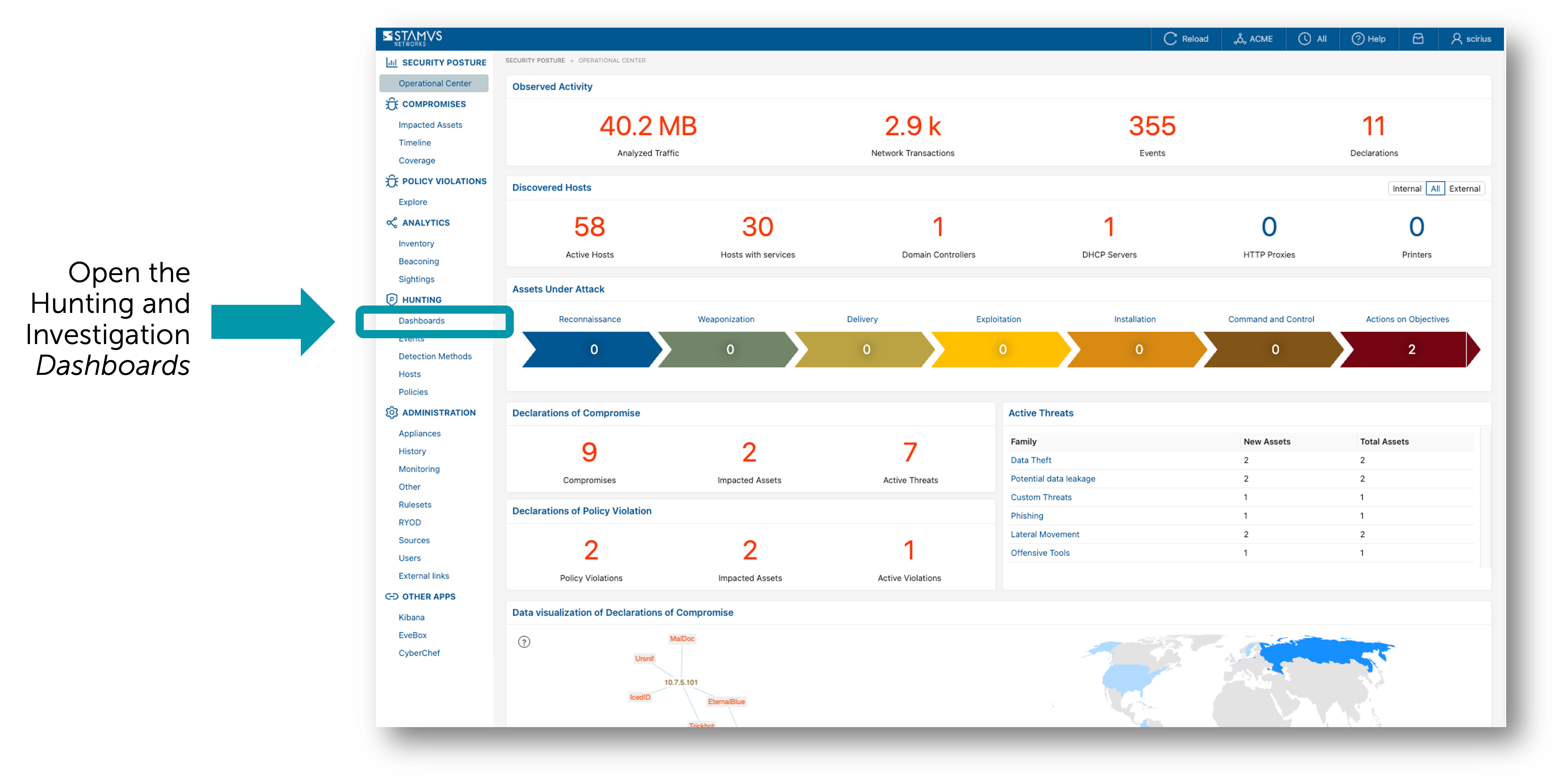
The Hunting and Investigation dashboard serves as the main launching point for the threat hunting tool. It includes over 50 elements of event metadata that can be viewed at a quick glance. It also allows the user to pivot and connect to the other hunting tools in the system.
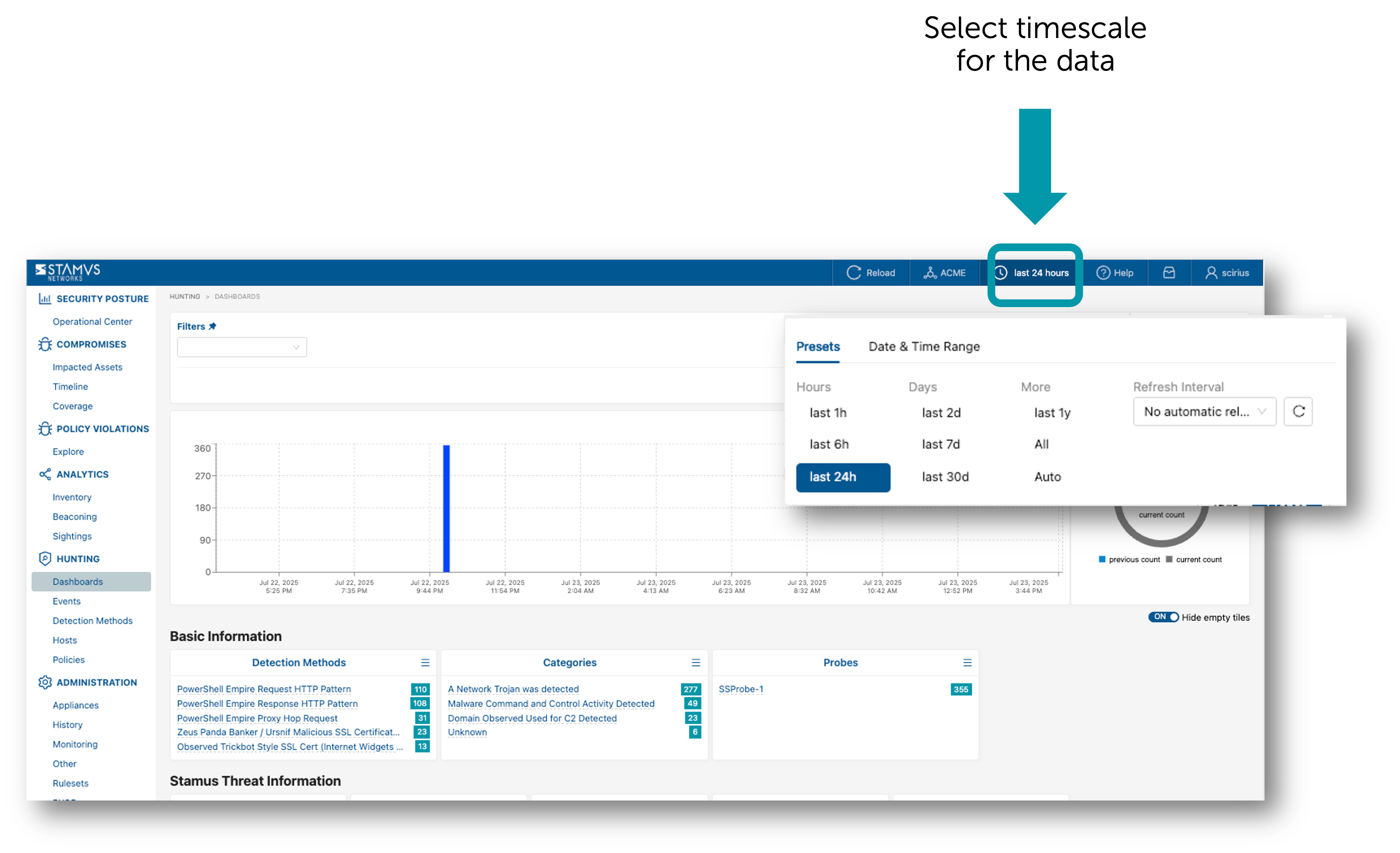
From here you can select the timescale of the data in which you wish to hunt.
Next, open the Filter Sets window from the top menu bar.
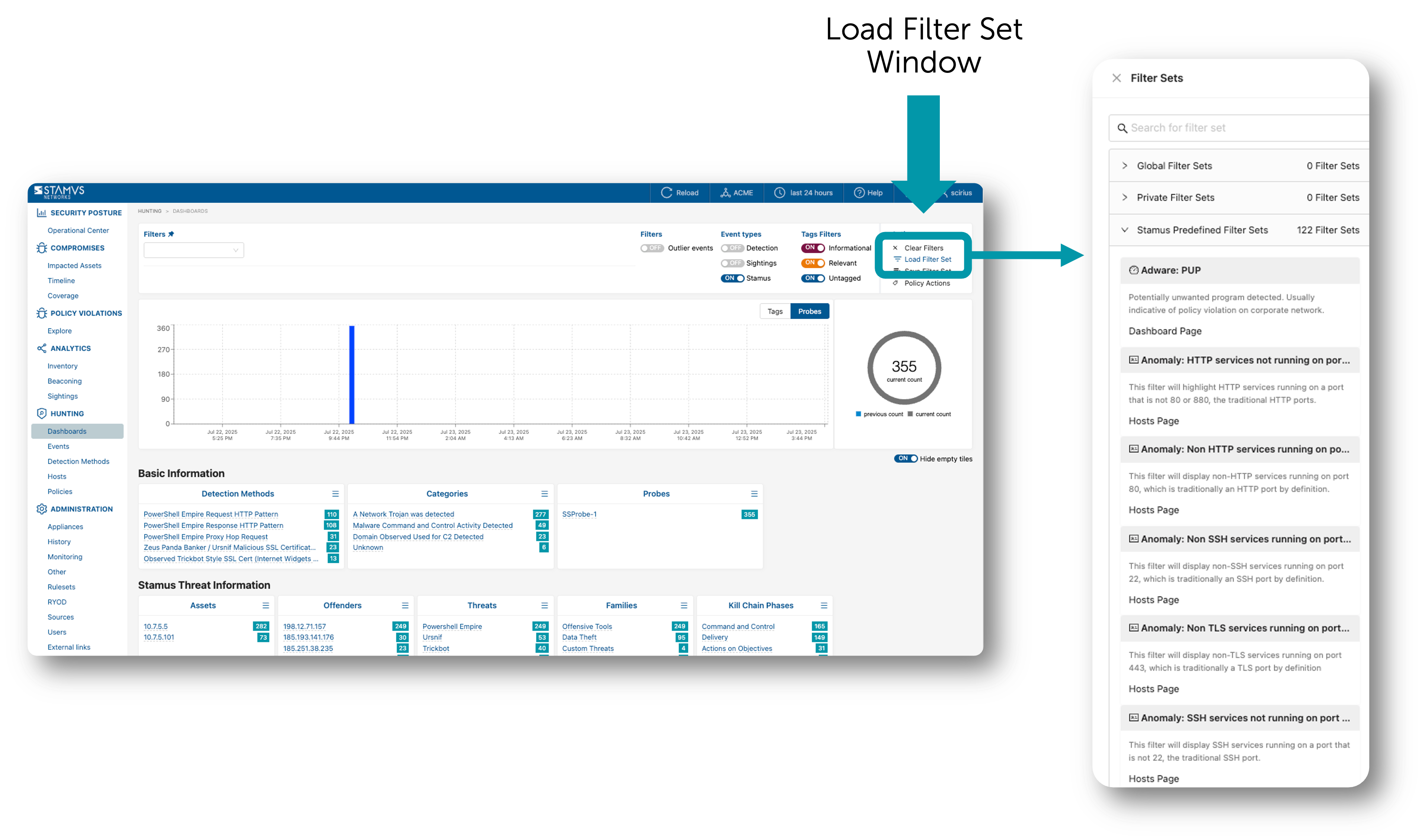
With the filter set window open, select the filter you wish to apply. You may do this by searching for the filter set in the search bar at the top of the pop-up window or by scrolling until you find the filter you are looking for.
When you click on the filter in the pop-up window, the filter is applied to the data, and the criteria defined by the filter set appear in Clear NDR® hunt dashboard’s active filters bar.
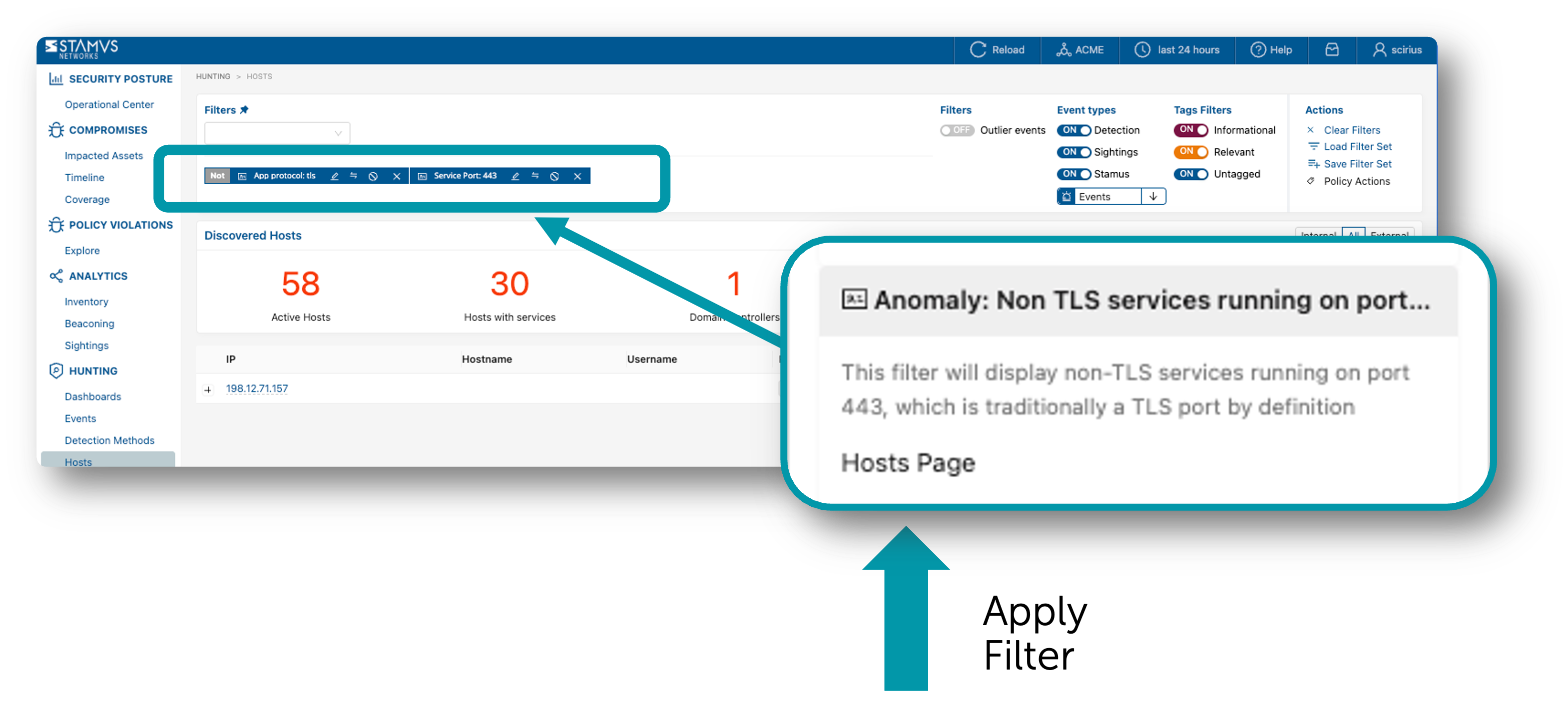
Once the filter set is applied, the security analyst may click on the magnifying glass icons beside the various data elements to further filter the data or they may click on the various data elements directly to pivot into a different view altogether. Often, the next step for the analyst is to review the various hosts identified by the filter to gain additional context. In the example below, the user has clicked on the “Hosts” item on the left hand navigation pane to pull up the listing of all hosts involved in this filtered activity.
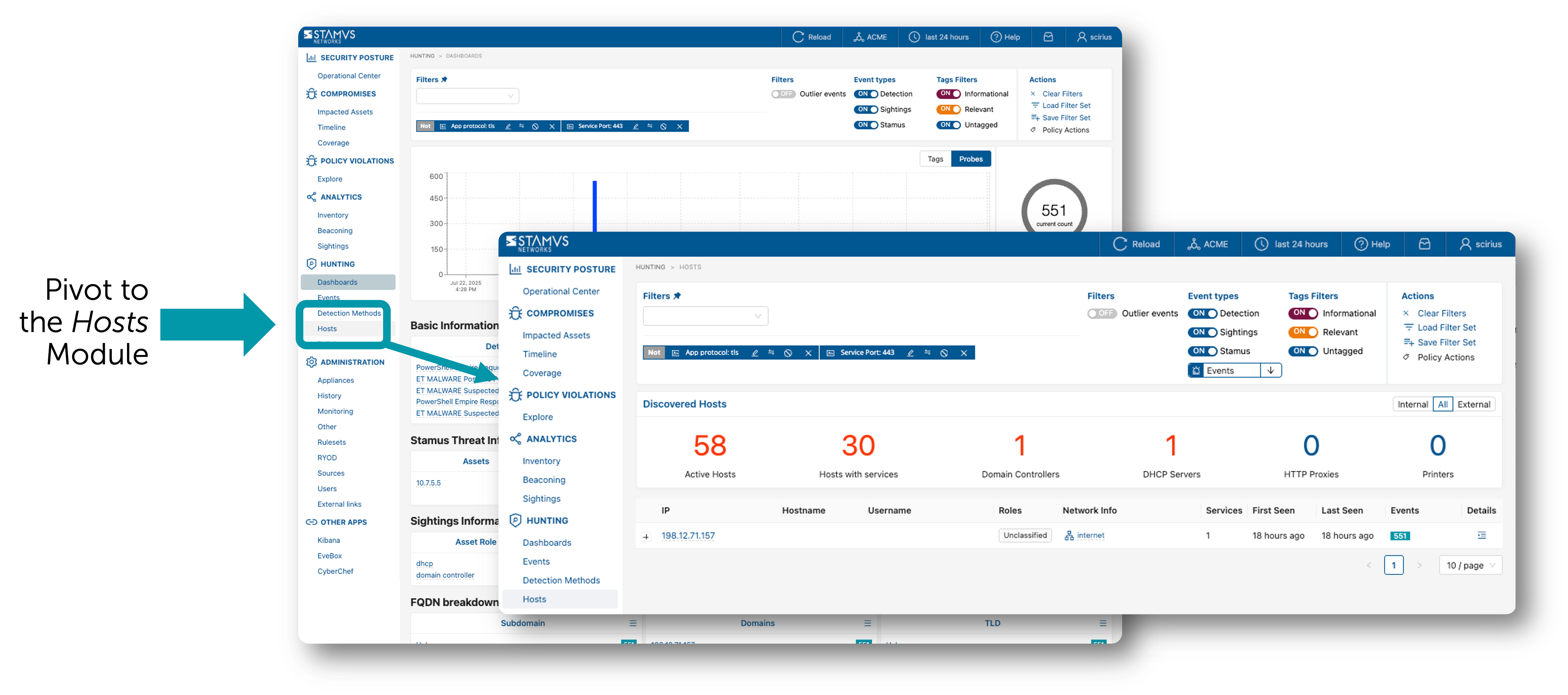
User Defined Filters
Adding Filter Criteria
A security analyst may apply additional criteria to any of the predefined filters to advance their hunt. These criteria include IP address, specific network probe, message, not-in-message, port, method ID, ES filter, protocol, organization-specific network names, and more.
By simply clicking on the magnifier icons next to the metadata field value, a user may apply additional filter criteria to the data using various metadata fields in the events. Any field part of a filter set can further be edited and wild carded if needed.
Hunting Filers allow searching alert’s metadata in various ways such as searching for an IP address, a specific probe, a port number, a method SID, and more.

Some filters can be negated (NOT filter) and others support wildcard notation for pattern matching. See below.
Filter Type |
Input |
Negate |
Wildcard |
Description |
|---|---|---|---|---|
IP |
IP address |
Yes |
No |
Filter on an IP address, source or destination |
Probe |
string |
Yes |
Yes |
Filter on designated network probes |
Message |
string |
No |
No |
Filter on a specific word |
Not In Message |
string |
No |
Yes |
Exclude matching words from the results |
Port |
integer |
Yes |
No |
Filter on a port number, source or destination |
Method ID |
string |
Yes |
No |
Filter or exclude a specific method identifier |
ES Filter |
string |
Yes |
No |
Filter with a custom boolean Elasticsearch filter |
Protocol |
string |
Yes |
Yes |
Shortcut to access most common protocols and fields used for filtering |
Network Def |
string |
Yes |
Yes |
Filter alerts from a specific organisation from Network Definitions (ex: Accounting) |
IP Filter
The IP filter allows searching for an IP address regardless of whether this IP has been observed as the source or the destination of the communication.
Hint
The IP filter also allows typing a subnet such as IP: 10.7.0.0/24 to only get alerts from systems belonging to this subnet. This notation also applies to other IP fields such as src_ip or dest_ip
If you want to limit the results to either a source IP or a destination IP, there are multiple ways to achieve this goal. To illustrate this, let’s see how we can filter on the source IP 10.7.5.5.
Example 1
From the Dashboard page, locate the Organizational Information section and the card Attackers
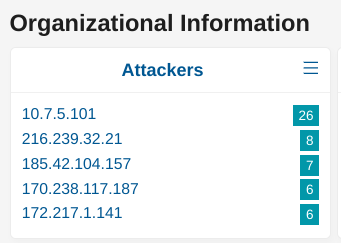
If the desired IP is already listed in the TOP5, simply click on the “+” magnifier to add this source IP as a filter. Otherwise, click on the “3 vertical dots” in the card’s title to see the full list. Locate the desired IP and add it as a filter using the “+” magnifier.
Example 2
From the Events page, set an IP address filter on the desired IP such as IP: 10.7.5.5. As you will see in the results, this IP will appear as either the source or the destination of the communication. Scroll down the alerts list until you find an alert that matches your criteria (i.e. 10.7.5.5 as source IP in this example). Open the alert panel and under the block IP and basic information click on the “+” magnifier to add this source IP as a filter.
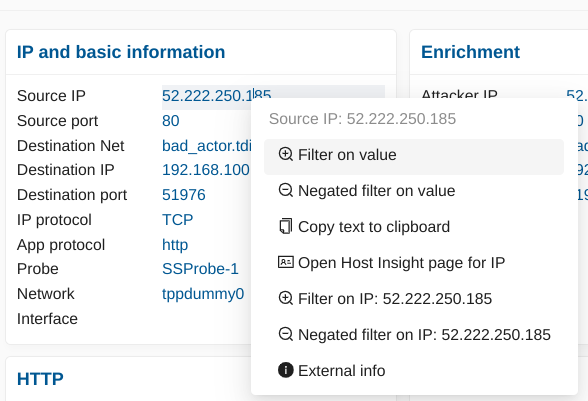
The Active Filters are now composed of the 2 filters IP: 10.7.5.5 AND src_ip: 10.7.5.5. At this point, you may decide to remove the IP filter to only have the src_ip filter depending on the search you are trying to build.
Example 3
Finally, another way to achieve this goal could be using ES Filters (see below for more details) by typing the expression src_ip: 10.7.5.5
ES Filters
Clear NDR® Central Server relies on the ELK stack to allow searching alerts and their associated metadata. With Enriched Hunting, one can perform hunting activities and our software hides the complexity of ELK through the use of our interface that allows selecting desired fields and creating active filters without the need of understanding the underlying data structure nor the ELK search logic.
However, in some situations, relying on Elasticsearch Filters, or ES Filters, may come handy for advanced use cases.
Under The Hood
Under the hood, Clear NDR® Central Server uses ELK to store and index the data it receives: alerts and protocol metadata. Each category of data has its own index, for example, alerts will be stored in logstash-alerts, DNS events will be stored into logstats-dns, HTTP events will be stored into logstats-http and so on.
ES Filters allows querying the logstats-alerts index to access alerts’ metadata such as source IP, destination IP, and protocol specific content such as HTTP User-Agent or Payload content for example. ES Filters queries ELK uses Apache Lucene as a query language and simply put, a search is a boolean expression composed of terms, and a term is a word or a pattern.
For example, to search for a source IP of value 10.1.2.3, one would write src_ip: 10.1.2.3. Here, src_ip is the term, followed by a colon and the searched value. The colon indicates an equality such as “src_ip is 10.1.2.3”.
As a search is a boolean expression, it is possible to use operators such as AND, OR, NOT, etc. For example, the query src_ip: 10.7.5.5 OR src_ip: 10.7.5.101 would list all alerts from either sources 10.7.5.101 and 10.7.5.5.
Important
ES Filters aren’t compatible with Hunting Policies as of U38.
Note
Kibana Query Language (KQL) was later introduced as an alternative to Apache Lucene and is currently not supported by Clear NDR® Central Server.
See also
More information on Apache Lucene can be found on Apache Lucene website
Knowing the Fields to Use
When building a query, the first thing we need to know are the fields names available we can use. Simply put, any fields displayed in the Hunting interface can be used and to see the list of all the available fields, simply go under JSON View (Alerts tab).
{
    "flow_id":1587674205492238,
    "stream":1,
    "dest_port":443,
    "geoip":{
        "continent":{
            "code":"EU",
            "geoname_id":6255148,
            "name":"Europe",
        },
        "country_name":"Romania",
        "continent_code":"EU",
        "timezone":"Europe/Bucharest",
        "country":{
            "geoname_id":798549,
            "iso_code":"RO",
            "is_in_european_union":true,
            "name":"Romania",
        }
    },
    "@timestamp":"2021-12-08T04:31:06.157Z",
    "src_port":62227,
    "dest_ip":"-REDACTED-",
    "tls":{
        "ja3s":{
            "string":"769,49172,65281-11",
            "hash":"623de93db17d313345d7ea481e7443cf",
        },
        "fingerprint":"34:f0:60:57:ee:a1:ba:0e:cd:07:34:fb:78:90:e5:b5:4b:3f:89:dc",
        "version":"TLSv1",
    }
}
From the above snippet, we can see different field names we can use to write an ES Filter. Fields that are nested must be concatenated using a dot, for example, "tls": { "ja3s": { "string": "..." }} will be accessed with tls.ja3s.string.
Examples:
dest_port: [1024 TO 65535]will retrieve all alerts from which the destination port of the connection is between 1,024 and 65,535.dest_port: 443will retrieve all alerts from which the destination port is 443geoip.country.iso_code: ROwill retrieve all alerts associated to Romaniageoip.country.iso_code: R*will retrieve all alerts associated with any country having a country code starting with the letter “R” such as Romania (RO) or Russia (RU).payload_printable: *COMCTL32*will retrieve all alerts having the substring COMCTL32 in the payload. This could be “COMCTL32”, “fooCOMCTL32”, “COMCTL32bar”, “fooCOMCTL32bar”, and so onhttp.http_response_body_printable: *msdos*will retrieve alerts having the substring MSDOS in the HTTP Response Bodytls.version: tlsv1will retrieve alerts where TLSv1 was used for SSL
Note
Pattern searches are case insensitive. Searching for geoip.country.iso_code: RO and geoip.country.iso_code: ro will lead to the same results. Fields name are however case sensitive and must be written in lowercase (SRC_IP is invalid for example, src_ip must be used)
Hint
Some of the above examples are really simple and one doesn’t necessarily need to write ES Filters because the web interface allows selecting most of those values in a single click from the alert’s panel
Attention
One of the common error when using wildcards is to have a space between the wildcard and the searched pattern such as payload_printable: * COMCTL32*. In that case, the search will literally return anything!
Note
Enriched Hunting provides FilterSets out of the box and some of them use ES Filters. Besides, some of them use the notation field.keyword: value. The operator “.keyword” from Elasticsearch perform search queries by explicitly stating that the field value shouldn’t be broken into tokens (e.g “New York” could match “New” or “York” otherwise)
Global Searches
In some situations, it can also be interesting to search for a pattern regardless of the field in which this pattern may be stored.
Note
Such a search may take a little longer as all fields need to be scanned so make sure to use specific patterns that won’t match on many things!
To search for the word “COMCTL32”, simply put “COMCTL32” in the ES Filter input without giving any field name.
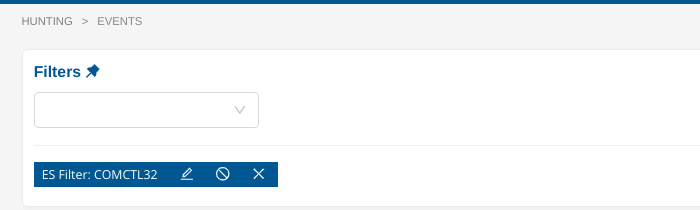
Similarly, to search for a substring, use the wildcard notation, either at the beginning of the pattern or at the end of it, or both.
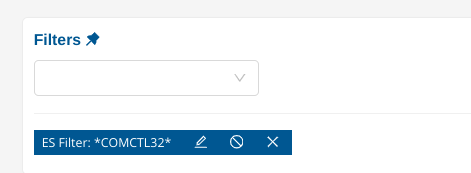
Finally, both fields searches and global searches can be mixed up to create more complex queries such as *Mozilla* AND NOT http.http_user_agent: *Mozilla* which will search for the substring Mozilla in any fields and will exclude all events having only a match on the HTTP User-Agent.
Specific Filters
Note
Any filter specified on those pages will not be carried to the other pages as they only apply on those specific pages. However, they are not removed and so when returning back the initial page, the filter will still be present.
Detection Methods
To scan and search the detection methods more easily, the page Detection Methods extend the default filters with the following ones.
Filter Type |
Input |
Negate |
Wildcard |
Description |
|---|---|---|---|---|
Events min |
integer |
No |
No |
Filter detection methods that have at least the specified number of matches |
Events max |
integer |
No |
No |
Filter detection methods that have at most the specified number of matches |
Content |
string |
No |
No |
Filter detection methods having the specified substring |
Not in Content |
string |
No |
No |
Exclude detection methods having the specified substring |
Hint
The substring matching used in Content and Not In Content doesn’t require any special character such as a wildcard to match part of a word. For example, Content: CHA would match CHAT, Charset and so on. This is case insensitive.
Hosts vs Inventory
Hosts entries are categorized into two primary views in the Hosts and Inventory pages. These categories differentiate hosts based on their alert activity and overall presence in the network.
Hosts
Purpose: The Hosts view provides a focused look at hosts that have triggered alerts. This section highlights hosts that have generated security alerts or anomalies.
Visibility: Hosts appear in this view only when there is an active alert or issue associated with them. This allows security teams to prioritize attention on potentially compromised or high-risk hosts.
Use Case: Use Hosts to quickly respond to active threats, investigate alerts, and perform real-time monitoring of suspicious host activity.
Inventory
Purpose: The Inventory view serves as a complete list of all hosts observed by the system, regardless of whether they have triggered an alert.
Visibility: Every host that has been detected in the network is listed here, offering a comprehensive overview of network assets. This includes hosts that are currently idle or have not shown any unusual behavior.
Use Case: Use Inventory to gain a holistic view of all network assets, maintain an up-to-date catalog of known hosts, and track normal behavior even in the absence of alerts.
Hosts
To search the observed hosts in your environment more easily, the page Hosts extend the default filters with the following ones.
Filter Type |
Input |
Negate |
Wildcard |
Description |
|---|---|---|---|---|
Hosts: HTTP User Agent |
string |
Yes |
Yes |
Filter hosts based on observed HTTP User Agents |
Hosts: TLS JA3 |
string |
Yes |
Yes |
Filter hosts based on observed JA3 fingerprints |
Hosts: SSH Client Version |
string |
Yes |
Yes |
Filter hosts based on observed SSH Client version |
Hosts: Username |
string |
Yes |
Yes |
Filter hosts based on observed Username |
Hosts: Hostname |
string |
Yes |
Yes |
Filter hosts based on observed Hostname |
Hosts: Services |
string |
Yes |
Yes |
Filter hosts based on observed Services |
Hosts: Counts |
integer |
Yes |
No |
Filter hosts having at least/most the specified count of Services, Hostnames, TLS Agents, HTTP User-Agent, SSH Clients or Usernames |
Hosts with services
Searching for all hosts that have certain services or protocols present, can be achieved on the Inventory page with the following filter from the filter drop down menu: Host filters -> Services.
Filter Type |
Input |
Negate |
Wildcard |
Description |
|---|---|---|---|---|
IP protocol |
string |
Yes |
Yes |
Filter all hosts based on |
Service port |
integer |
Yes |
Yes |
Filter all hosts based on |
App protocol |
string |
Yes |
Yes |
Filter all hosts based on |
Https server |
string |
Yes |
Yes |
Filter all hosts based on the name of the |
SSH > Server version |
string |
Yes |
Yes |
Filter all hosts based on seen |
TLS > Fingerprint |
string |
Yes |
Yes |
Filter all hosts based on TLS protocol |
TLS > Issuer DN |
string |
Yes |
Yes |
Filter all hosts based on TLS protocol |
TLS > Subject DN |
string |
Yes |
Yes |
Filter all hosts based on TLS protocol |
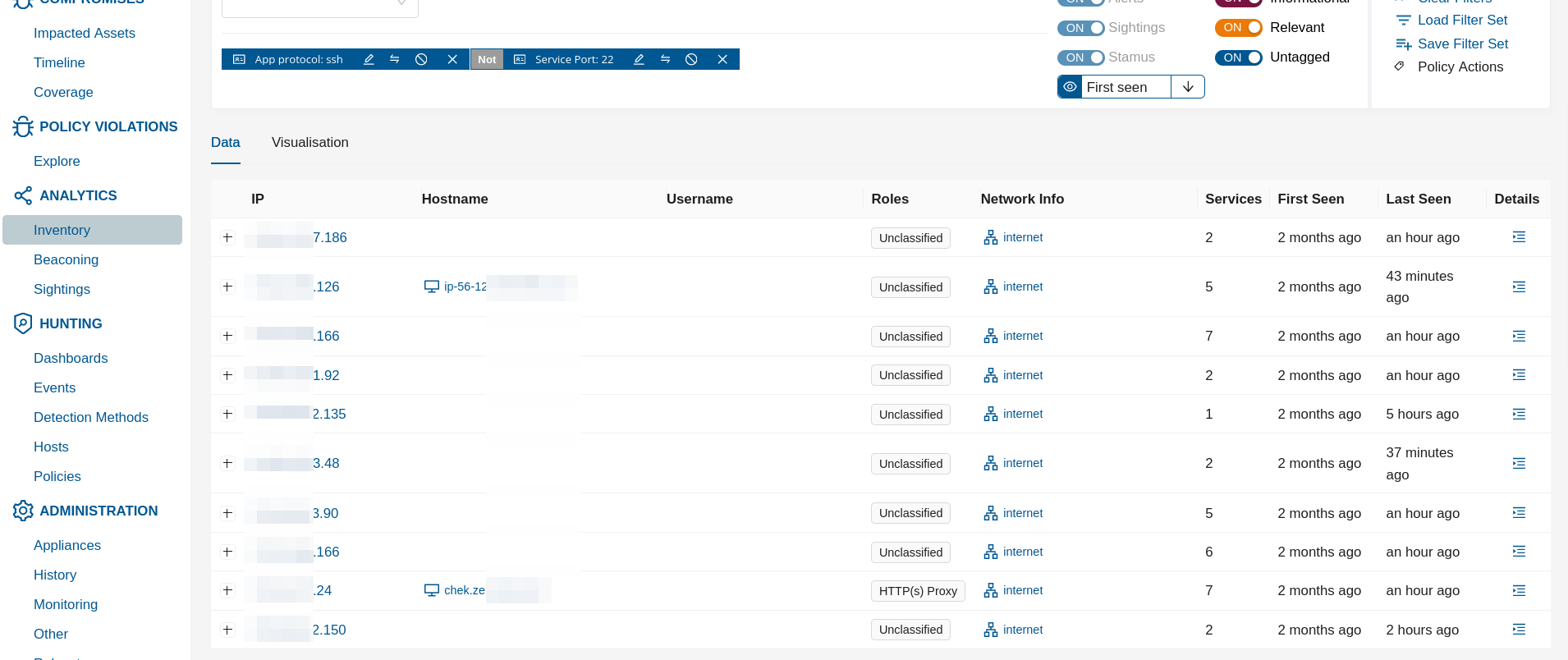
In the example screenshot above it is shown how to hunt for ssh service that is not running ot its default port.
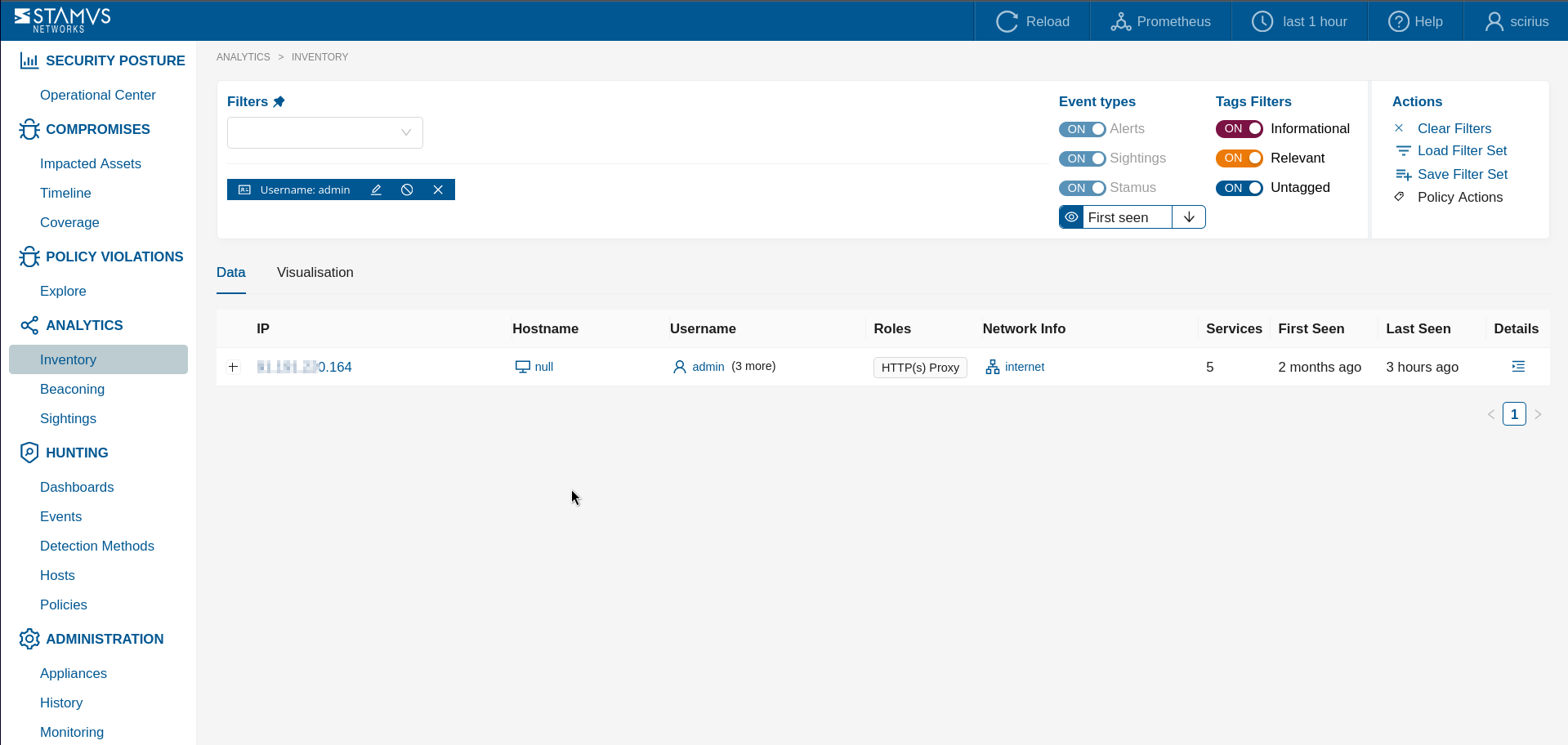
In another example screenshot above it is shown how we can discover certain usernames that have shown up on hosts in the network.
Creating Filter Sets
The Hunting interface allows you to create your own filter sets. You can choose between creating a Global Filter Set or a Private Filter Set
Creating Global Filter Sets
Global filter sets are usually shared between all authorized and authenticated users on your system. To create such a filter set, you first have to apply the filters you would like to use.
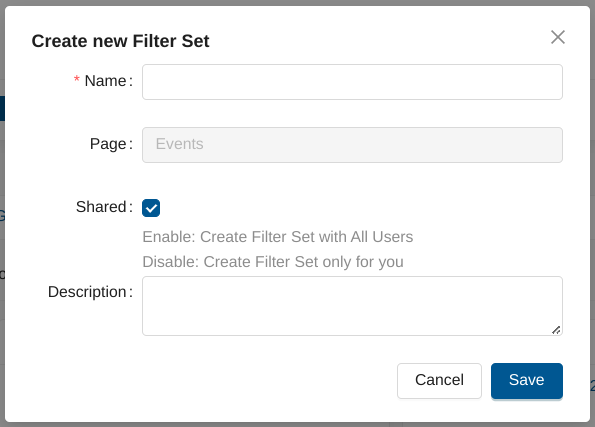
Next, you should click on Save Filter Set under Actions - on the right hand-side of the Hunting interface.
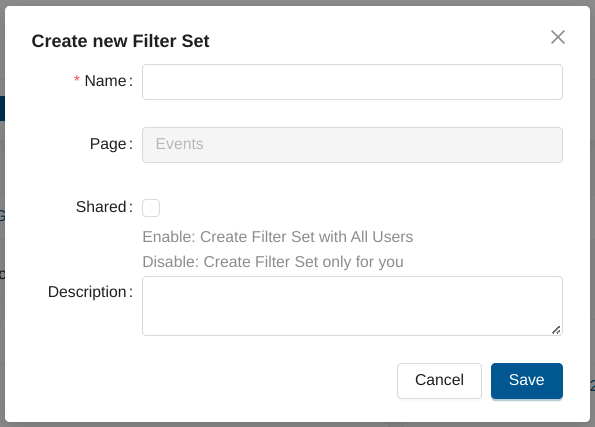
Fill in the Create new Filter Set form and select the Shared checkbox.
Creating Private Filter Sets
Private filter sets are available only to the user, who has created them. To create such a filter set, you first have to apply the filters you would like to use.
Next, you should click on Save Filter Set under Actions - on the right hand-side of the Hunting interface.
Fill in the Create new Filter Set form and leave the Shared checkbox unselected.
Loading Filter Sets
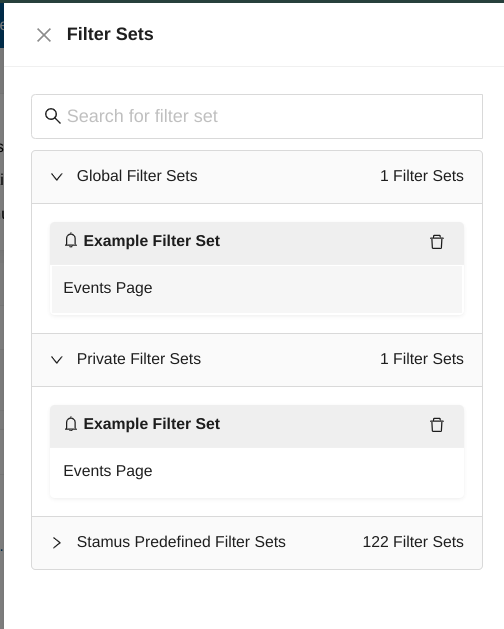
If you would like to load a filter set, you have to go to any page of the Hunting interface, then click on Load Filter Set from the Actions menu.
Then, you can use the search field to look for a specific filter set within the Global, Private and Stamus Predefined Filter Sets.
Exporting Filter Sets
If you would like to export your Global/Private filter sets, you can do this from our Administration interface.
You have to go to Rulesets page -> Import/Export Policies/Filtersets under Actions panel on the left hand-side of the page.
Note
The import/export format is json.
Deleting Filter Sets
In order to delete a custom created filter set, you need to click on Load Filter Set from the Actions menu.
Note
Only Global Filter Sets and Private Filter Sets can be deleted.
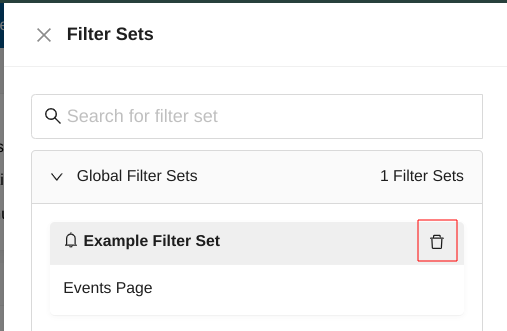
To delete a filter set - you have to click on the delete icon next to its name.
Complete List of Predefined Hunting Filter Sets
Adware Filter Sets (1)
This group of filter sets provide guided hunting to identify various potentially unwanted programs operating on the network.
Potentially Unwanted Program - Potentially unwanted program (PUP) detected. Usually indicative of policy violation on the network.
Use case examples: Security teams can use this filter to identify hosts that have silently installed PUPs through software bundles or drive-by downloads, which are often precursors to more serious malware infections. It helps compliance auditors quickly enumerate policy-violating software installations across the enterprise, enabling targeted remediation efforts.
Anomaly Filter Sets (6)
This group of filter sets provide guided hunting to identify hosts using traditional services (such as TLS, SSH, HTTP, etc) on non-traditional ports.
HTTP services not running on port 80/8080 - This filter will highlight HTTP services running on a port that is not 80 or 880, the traditional HTTP ports.
Use case examples: Hunters can use this filter to detect covert C2 channels or data exfiltration tunnels that deliberately use non-standard ports to evade perimeter controls. It also helps identify misconfigured or unauthorized web services running on unusual ports that may represent unmanaged attack surface.
Non HTTP services running on port 80 - This filter will display non-HTTP services running on port 80, which is traditionally an HTTP port by definition.
Use case examples: Threat hunters can use this to uncover malware or backdoors that leverage port 80 to blend in with legitimate web traffic and bypass firewalls that only inspect HTTP traffic. It is also useful for detecting protocol tunneling techniques where adversaries hide non-HTTP communications inside commonly allowed port 80 connections.
Non SSH services running on port 22 - This filter will display non-SSH services running on port 22, which is traditionally an SSH port by definition.
Use case examples: This filter can expose attacker-controlled backdoors or reverse shells masquerading as SSH traffic on port 22 to blend in with legitimate administrative traffic. It is particularly valuable for detecting protocol impersonation attacks where malware exploits the universal firewall allowance of SSH to establish persistence.
Non TLS services running on port 443 - This filter will display non-TLS services running on port 443, which is traditionally a TLS port by definition.
Use case examples: Hunters can leverage this filter to detect malware or C2 frameworks that abuse port 443 to bypass egress filtering while communicating using non-TLS protocols. This helps surface command-and-control infrastructure that deliberately chooses HTTPS ports to evade detection by policies that allow outbound 443 traffic.
SSH services not running on port 22 - This filter will display SSH services running on a port that is not 22, the traditional SSH port.
Use case examples: This filter can reveal unauthorized SSH servers or attacker-planted backdoors that operate on non-standard ports to evade port-based firewall rules and reduce visibility. It is equally effective for identifying shadow IT, such as developer-installed SSH servers on ephemeral ports that violate organizational security policy.
TLS services not running on port 443 - This filter will display TLS services running on a port that is not 443, the traditional TLS port.
Use case examples: Security analysts can use this filter to identify encrypted C2 channels or data exfiltration traffic that leverages TLS on unusual ports to evade standard SSL inspection policies. It can also reveal misconfigured or rogue TLS services that may be handling sensitive data outside of monitored infrastructure.
Compliance Filter Sets (1)
This group of filter sets provide guided hunting to identify hosts with unusual encryption certificate usage operating on the network.
Not common SSL certificate issuers - This filter displays results of network traffic analysis that have TLS services using uncommon SSL certificate issuers. Can be used to rapidly identify hosts using self-signed certificates on the network.
Use case examples: Hunters can use this filter to expose self-signed or uncommon certificates used by malware, C2 infrastructure, or rogue internal services attempting to encrypt traffic while avoiding detection. It also supports compliance audits by identifying hosts that are using certificates from unvetted or potentially compromised certificate authorities, which may indicate supply chain risk.
Hunt Filter Sets (86)
This group of filter sets provide guided hunting a broad array of hunting ideas based on metadata associated with events. These include obfuscated executables, suspicious zipped files transfers, suspicious payloads, successful scans, backdoors, exploits, crypto miners, base64 functions detected in events, and others.
Attack Response - This filter highlights detection events that are most likely successful compromises by looking for signs that an exploit actually worked, rather than just identifying the attempt. Great starting point for an unstructured hunt.
Use case examples: This is an ideal starting filter when beginning an unstructured hunt, as it surfaces events where exploits were likely successful rather than just attempted, dramatically reducing analyst workload. It helps incident responders prioritize their investigation queue by focusing on confirmed compromise indicators rather than speculative threat signals.
Dotted Quad Host Request - This filter highlights detection events of network download request sent directly to an IP address instead of domain. It is a good candidate for unstructured hunt.
Use case examples: Hunters can use this filter to detect malware callbacks to C2 servers that bypass DNS resolution, a common technique used to avoid DNS-based threat intelligence blocks. It also helps identify lateral movement or beaconing activity where an attacker contacts infrastructure directly by IP to maintain persistence after initial DNS-based detection has occurred.
HTTP obfuscated executable as Image content - This filter set can be used to uncover malware posing as images in HTTP content. In this case, the HTTP content presents itself as an image (with a png, gif, jpeg extension, for example), but the actual downloaded or transferred file is an executable.
Use case examples: This filter is highly effective at uncovering steganography-based malware delivery, where threat actors embed executables within image files to bypass content inspection gateways. Analysts can use it to trace the delivery chain of multi-stage malware loaders that disguise their payloads as innocuous image files during the initial infection phase.
Phishing events - This filter identified suspicious, likely, or successful phishing communication.
Use case examples: Security teams can apply this filter to quickly triage potential phishing incidents, isolating the affected hosts and understanding the scope of a social engineering campaign. It also supports threat intelligence operations by surfacing the domains and infrastructure associated with active phishing campaigns targeting the organization.
Suspicious DNS requests - This filter highlights DNS requests to suspicious or non-traditional domains.
Use case examples: Hunters can use this filter to detect domain generation algorithm (DGA) activity or DNS tunneling used by malware to establish covert communications. It also helps identify early-stage compromise by uncovering DNS queries to newly registered, typosquatted, or algorithmically generated domains before other indicators become visible.
Lateral SMB enumeration activities - This filter returns all SMB enumeration activities seen on the network. It is a good starting pint of unstructured hunt.
Use case examples: This filter is critical for detecting the reconnaissance phase of lateral movement, where attackers use SMB enumeration to map internal network shares and discover valuable assets. It helps analysts identify compromised hosts that are actively performing internal discovery operations, a key indicator of post-exploitation activity.
Lateral SMB user enumeration activities - This filter returns all SMB user enumeration activities seen on the network. It is a good starting pint of unstructured hunt.
Use case examples: Hunters can use this filter to detect credential harvesting preparation, where attackers enumerate user accounts via SMB to build targeted brute-force or pass-the-hash attack lists. It is especially valuable in detecting Active Directory-related attacks in their early stages, before privilege escalation has occurred.
Likely hostile domain events - This filter highlights DNS requests to likely hostile domains.
Use case examples: This filter provides a rapid way to identify network connections to known or suspected threat actor infrastructure, helping analysts prioritize incidents involving active threat campaigns. It can also help validate threat intelligence feeds by revealing which hostile domains are actively generating traffic on the monitored network.
Malware family present in events - This filter highlights the events in which malware family is identified.
Use case examples: Analysts can use this filter to instantly scope a potential outbreak by identifying which hosts have triggered detections associated with a specific malware family. It also accelerates incident response by providing attribution context, enabling teams to apply targeted countermeasures and remediation steps specific to that malware family.
Mikrotik SSH server - This filter highlights detection events related to RouterOS which has built in SSH (SSH v2) server that is enabled by default.
Use case examples: Hunters can use this filter to identify Mikrotik devices in environments where they are not authorized, as these devices have historically been targeted by botnets like VPNFilter for use as network-layer proxies. It also helps detect compromised Mikrotik infrastructure that may be used to intercept or redirect traffic within the organization.
Newly Registered Domains (NRD) - This filter highlights NRD communication, including Entropy or Phishing NRD. It is a great starting point for novel threats hunting.
Use case examples: This filter is a powerful tool for detecting zero-day phishing campaigns and malware distribution infrastructure that leverages freshly registered domains to evade reputation-based blocklists. Hunters can use it to surface novel threats early in their lifecycle, before threat intelligence feeds have categorized the associated domains as malicious.
Powershell specific - This filter highlights Powershell specific events that are good starting point for an unstructured hunt.
Use case examples: This filter is essential for detecting “living off the land” attacks where adversaries leverage PowerShell to execute malicious commands, download second-stage payloads, or establish persistence. It helps security teams identify suspicious PowerShell activity across the network, enabling correlation with endpoint telemetry for a comprehensive view of potential compromises.
Raw TCP files transfers - This filter highlights detection events of file transfers over raw TCP but not over specific application protocol such as http/http2/smb/smtp/nfs/ftp.
Use case examples: Hunters can use this filter to detect covert file exfiltration or C2 communications that bypass application-layer protocol inspection by operating over raw TCP connections. It is also valuable for identifying data staging activities where an attacker transfers files internally between compromised hosts using custom or undocumented protocols.
Server SIGHTINGS - This filter highlights new, previously unseen servers like HTTP/SSH internal or external ones. This is a good starting point of unstructured hunt.
Use case examples: This filter excels at detecting unauthorized or rogue servers that appear on the network for the first time, which may indicate an attacker has deployed malicious infrastructure. It also supports asset management by providing a continuous feed of newly observed servers that may require security review and onboarding into the organization’s inventory.
SMB SIGHTINGS - This filter highlights new, previously unseen SMB file access or transfer. This is a good starting point of unstructured hunt.
Use case examples: Analysts can use this filter to detect unauthorized SMB access to sensitive shares that has not been previously observed, which is a strong indicator of lateral movement or data staging. It provides early warning of potential ransomware activity, where encrypted file access or new SMB connections to backup servers can signal the beginning of a destructive attack.
Stamus Advanced Hunting - This hunting filter set highlights events from the Stamus Advanced Hunting detection that are good starting point for unstructured hunt.
Use case examples: This filter set provides access to proprietary Stamus Networks detection logic, making it a powerful starting point for discovering threats that go beyond conventional signature matching. Hunters can use it to uncover subtle behavioral anomalies and multi-stage attack patterns that would otherwise require extensive custom rule development to detect.
Suspicious SMTP EXE attachments - The filter set returns SMTP based detection events of suspicious executable attachments.
Use case examples: This filter is critical for detecting email-borne malware delivery, where attackers send executable attachments disguised or directly attached to evade email security gateways. It helps incident responders quickly identify the scope of a phishing campaign that used executable payloads and correlate affected recipients on the network.
Tenable SSH server - This filter highlights detection events related to Tenable SSH Security Center Server.
Use case examples: Hunters can use this filter to verify that Tenable’s security scanning infrastructure is operating only from authorized sources, helping detect unauthorized use of Tenable tooling that could indicate insider threat or compromised scanning credentials. It also helps ensure that SSH-based scanning activity is properly scoped and not inadvertently targeting sensitive network segments.
Exploit kit present - This filter highlights the events that use exploit kits.
Use case examples: This filter enables analysts to detect drive-by compromise attempts where exploit kits are served to browsers, often indicating a watering hole attack or compromised website visited by an employee. It helps security teams quickly identify affected hosts and correlate browser-based exploitation attempts with subsequent malware installation activity.
Executable code present - This filter highlights the events that detect any executable code.
Use case examples: Hunters can apply this filter to detect any network activity associated with executable code transfer, providing a broad initial sweep for potential malware delivery across all protocols. It is especially useful during incident investigation to map all the instances of executable code observed in network traffic, helping to reconstruct the full attack chain.
C2 domains detected - This filter highlights the events that C2/CnC domains detected.
Use case examples: This filter is a direct indicator of active compromise, helping analysts immediately identify hosts that are communicating with known command-and-control infrastructure. It accelerates incident response by providing a list of affected endpoints that require immediate isolation and forensic investigation.
Command and Control activity present (CnC) - This filter highlights the events associated with command and control activity (CnC).
Use case examples: Hunters can use this filter to detect active post-exploitation activity, where an attacker is maintaining communication with compromised hosts to execute commands or exfiltrate data. It provides critical intelligence for containment decisions by revealing the scope and active channels of ongoing attacker control within the network.
Admin payload search - This filter highlights the events that include “Admin” or “Administrator” in their alert payload.
Use case examples: This filter helps detect brute-force attacks, unauthorized admin access attempts, or tools that probe for administrative interfaces across the network. It is useful in identifying post-compromise privilege escalation activity where an attacker is attempting to gain administrative control of discovered systems.
Backdoors and exploits for public facing web servers - This filter set returns a very potent information set of events that indicate either an ongoing backdoor or an exploit for public facing web servers or php based applications.
Use case examples: This filter is essential for any organization running internet-facing web infrastructure, as it surfaces active web shell activity, exploitation attempts, and backdoor access in near real time. Security teams can use it to detect unauthorized access to web applications and correlate the events with logs to reconstruct how an attacker established an initial foothold.
Coinminers - This filter highlights the events that are related to coin miners.
Use case examples: Hunters can use this filter to detect unauthorized cryptocurrency mining operations on the network, which directly consume compute resources and may indicate a broader compromise of multiple endpoints. It also serves as an indicator of supply chain or watering hole attacks, where coinminer payloads are often bundled with other malware as a secondary monetization strategy.
Crypto miners or Ransomware - This general wildcard filter highlights events of cryptominers or ransomware malware variants.
Use case examples: This broad filter is a useful first-pass triage tool for detecting two of the most financially damaging malware categories operating on organizational networks. It enables rapid identification of infected hosts before ransomware encryption spreads laterally or coinminer code consumes critical infrastructure resources.
Current events - This filter highlights the events that trigger based on the CURRENT_EVENTS ET rules.
Use case examples: This filter helps hunters stay ahead of emerging threats by surfacing detections based on the most recently published signatures tracking active threat campaigns. It is particularly valuable during times of heightened threat activity, such as the exploitation of a newly disclosed zero-day vulnerability, enabling rapid assessment of exposure.
DNS over HTTPS - This filter returns all the events related to DNS over HTTPS usage transactions. It is important here to review providers that are highlighted. In many organizations, this may also be a policy violation.
Use case examples: Hunters can use this filter to detect hosts bypassing corporate DNS resolution policies by tunneling DNS queries over HTTPS to external resolvers, which may hide malicious domain lookups. It also helps identify policy violations where employees or malware use DoH providers to circumvent internal DNS monitoring and filtering controls.
DNS related events - This filter highlights all the events with DNS-related metadata.
Use case examples: This filter provides a comprehensive view of DNS-related detections, making it an effective starting point for hunting DNS-based attack techniques such as DNS tunneling, DGA, and DNS rebinding. Analysts can use it to correlate DNS anomalies with other events to build a complete picture of attacker reconnaissance and communication patterns.
DOS or Windows executable - This filter highlights all the events that are related to DOS or Windows executable HTTP transfers.
Use case examples: This filter helps detect malware delivery via HTTP by identifying transfers of Windows executables, a common technique used in drive-by downloads and spear phishing campaigns. Analysts can use it to trace the origin of executable file downloads and determine whether they represent authorized software distribution or attacker-controlled payload delivery.
Executable related events - This filter highlights all the events related to executable files, including downloads, posts, and others. This usually provides interesting data that warrants further investigation.
Use case examples: Hunters can apply this filter to surface all executable-related network activity, providing a comprehensive view of potential malware delivery, lateral movement tools, and unauthorized software distribution. It is a powerful starting point for mapping how executable payloads are moving across the network during an active incident or as part of proactive threat hunting.
Executable downloads from PowerShell - This filter highlights all the events that include executable-related transfers from PowerShell HTTP user agents.
Use case examples: This filter is critical for detecting “fileless” malware techniques where PowerShell is used as a download cradle to retrieve and execute malicious payloads directly in memory. It helps analysts identify compromised hosts that are being used as staging points for multi-stage attacks orchestrated through PowerShell-based C2 frameworks.
Executable downloads from programmable software - This filter highlights all the events that include executable-related transfers from HTTP user agents that are common scripting languages.
Use case examples: Hunters can use this filter to detect malicious use of scripting languages like Python or Ruby to download and execute payloads, a technique commonly used to evade detection by traditional endpoint security products. It is also useful for identifying unauthorized software development activity on production systems, where scripting tools are used to pull and run unapproved code.
HTTP Executable related events - This filter highlights all the events that take place via HTTP and are either posting or downloading executables.
Use case examples: This filter provides focused visibility into HTTP-based malware delivery and staging operations, enabling analysts to identify both downloads and uploads of executable content through the web layer. It is particularly effective for detecting web-based exploitation frameworks that leverage HTTP to deliver shellcode or droppers to victim systems.
HTTP POSTs - This filter highlights all the events that include HTTP POST requests. This type of request can hide malicious activity.
Use case examples: Hunters can use this filter to detect data exfiltration over HTTP POST requests, a common technique used by malware to transmit stolen credentials, files, or system information to attacker-controlled servers. It is also effective for uncovering C2 communications that use HTTP POST as a covert channel to receive commands and upload results.
HTTP direct requests and replies to private IP - This filter highlights all the events that include HTTP requests and responses directly to an internal IP address - not a domain name. This activity may be suspicious because a domain name is typically part of the transaction when communicating with servers inside the network. While common in some development environments, it could also indicate lateral movement.
Use case examples: This filter helps detect lateral movement where attackers communicate with internal web services directly by IP, bypassing DNS resolution and potentially evading URL-based security controls. It is particularly valuable for identifying attacker-controlled web servers or compromised internal hosts serving as C2 relay nodes within the corporate network.
HTTP likely direct IPv6 communication - This filter highlights all the events detecting direct IPv6 communication and communication events likely using directly IPv6 HTTP hosts.
Use case examples: Hunters can use this filter to detect malware that leverages direct IPv6 addressing to bypass IPv4-based security controls and monitoring tools that lack full dual-stack visibility. It is also useful for uncovering shadow IT services and unauthorized infrastructure that operates exclusively over IPv6 to avoid detection.
HTTP non-internal direct IP requests and replies - This filter highlights all the events that indicate HTTP requests and responses directly by IP - not using a domain name. This activity may be suspicious because a domain name is typically part of the transaction when communicating with servers outside the network (non private/internal IPs).
Use case examples: This filter helps detect malware beaconing to external C2 infrastructure using direct IP addresses instead of domain names, effectively bypassing DNS-based threat intelligence controls. It is also valuable for identifying data exfiltration attempts where attackers use hardcoded IP addresses to evade domain reputation filtering systems.
HTTP payloads containing admin - This filter highlights all the events that indicate HTTP payloads containing “admin”.
Use case examples: Hunters can use this filter to identify unauthorized attempts to access administrative interfaces, brute-force admin credentials, or interact with admin panels across web applications in the environment. It is also effective for detecting web-based exploitation frameworks that target admin functionality to escalate privileges or deploy web shells on compromised servers.
HTTP payloads containing root - This filter highlights all the events that indicate HTTP payloads containing “root”.
Use case examples: This filter helps detect exploitation attempts targeting root-level access on web servers or applications, as well as post-exploitation activity where root credentials are being used or validated over HTTP. Analysts can correlate these events with other indicators to determine whether a successful root-level compromise has occurred.
Hunting related events - This filter highlights all the events that are generated from rules with the “hunting” designation.
Use case examples: This filter surfaces all events generated by hunting-designated signatures, making it a powerful broad sweep for the most research-oriented and novel threat detections in the ruleset. Analysts can use it as a discovery mechanism for newly observed attack techniques that haven’t yet been promoted to high-confidence alert signatures.
Hosts with more than one user - This filter highlights all the hosts that have more than one user. This typically generates a list of good candidates for investigation.
Use case examples: This filter helps detect shared account usage or credential theft scenarios where multiple users have been observed operating from the same host, which may indicate compromised credentials being used by an attacker. It is also useful for identifying jump boxes, terminal servers, or workstations that may require additional monitoring due to elevated access risk.
Hosts with suspicious http user agents - This filter highlights all hosts that have been seen using suspicious and non-traditional user agent strings. This typically generates a list of good candidates for investigation.
Use case examples: Hunters can use this filter to identify malware, C2 frameworks, or exploit tools that use non-standard user agent strings that deviate from legitimate browser or application patterns. It is particularly effective at exposing automated attack tools and scanning frameworks that use custom or generic user agents during reconnaissance and exploitation phases.
Low noise recently-created signatures - This filter returns very interesting low noise events created from signatures from 2020 onward.
Use case examples: This filter helps hunters uncover high-fidelity detections from the latest threat intelligence, where new signatures have not yet generated enough events to be buried in noise. It is ideal for investigating exposure to the most recently catalogued attack techniques and vulnerability exploits before they become widespread.
Longer domain dns requests - This filter highlights all the DNS-related events with domains equal to or greater than 70 characters. The results can further be narrowed if needed by selecting or negating different TLDs from the interface. That gives a good first Hunting angle.
Use case examples: Hunters can use this filter to detect DNS tunneling activity, where attackers encode data within unusually long subdomain strings to exfiltrate data or receive commands over DNS. It also helps identify DGA-generated domain names from certain malware families that produce characteristically long, random-looking domain strings.
Low noise signature events - This filter highlights the events which have rarely triggered. These low noise alerts can sometimes hide valuable artifacts and discoveries.
Use case examples: This filter is a goldmine for threat hunters, as rarely-triggered signatures often represent highly specific detections of targeted attacks or sophisticated techniques that don’t generate widespread alerts. Analysts can use it to discover anomalous activity that would otherwise be lost in high-volume detection feeds, often revealing stealthy adversaries.
Malicious filenames in payloads - This filter highlights the events whose payloads contain known malicious files or filenames.
Use case examples: Hunters can use this filter to detect malware distribution attempts where files with known-malicious naming conventions are being transferred across the network. It helps analysts quickly identify the delivery vector and affected recipients of malware campaigns that use recognizable filename patterns associated with known threat actors.
Malware-related events - This filter highlights the malware-related events.
Use case examples: This filter provides a broad sweep of all malware-related detections, making it an effective starting point for incident scope assessment and proactive threat hunting across the organization. Security teams can use it to identify active malware campaigns, track the spread of infections, and prioritize remediation efforts based on the volume and distribution of affected hosts.
New executables seen - This filter highlights the events that are related to executables downloaded from new previously unseen locations.
Use case examples: This filter is particularly effective for detecting supply chain attacks and unauthorized software distribution, where new executables are downloaded from previously unobserved locations or servers. Hunters can use it to identify first-seen delivery of malware payloads before they have been catalogued by threat intelligence, providing early warning of novel threats.
Non common TLDs - This filter highlights the events which do NOT involve the most common top level domains. The resulting set can help focus the hunting activity related to http, dns, and uncommon events.
Use case examples: Hunters can use this filter to identify suspicious domain activity associated with uncommon top-level domains that are frequently used by threat actors to register phishing and malware distribution infrastructure cheaply. It helps analysts focus their investigation on the highest-risk subset of DNS and HTTP traffic by filtering out the noise of well-known TLDs.
Non lib/open ssh clients - This filter highlights the SSH-related events that have no libssh or openssh client version.
Use case examples: This filter helps detect non-standard SSH clients that may indicate attacker tools, custom malware implants, or unauthorized administrative software accessing systems via SSH. It is also valuable for identifying IoT devices, embedded systems, or appliances using proprietary SSH implementations that may have unpatched vulnerabilities.
Not common HTTP servers - This filter provides results for non Apache, Nginx, IIS HTTP servers. It would not be very usual to see some other HTTP servers on the network thus may be interesting to investigate.
Use case examples: Hunters can use this filter to detect rogue web servers deployed by attackers as C2 infrastructure or to serve malicious content from within the corporate network. It also helps identify unauthorized web applications and shadow IT deployments running on non-standard web server platforms that have not been vetted by the security team.
One word HTTP user agents - This filter highlights one-word HTTP user agents.
Use case examples: This filter is effective at detecting automated tools, malware, and custom attack frameworks that use minimal one-word user agent strings to make HTTP requests that appear programmatic rather than browser-generated. Analysts can correlate hosts exhibiting this behavior with other anomalies to identify compromised systems being used for automated exploitation or C2 beaconing.
Potential Bot HTTP user agents - This filter highlights user agents that may be potential bot crawlers.
Use case examples: Hunters can use this filter to identify hosts that are part of a botnet, being used for credential stuffing, web scraping, or distributed scanning operations against internal or external targets. It also helps detect infected hosts that may be receiving commands through HTTP-based bot C2 channels without triggering more specific malware signatures.
Punycode domains present in DNS, TLS or HTTP - This filter highlights the events that have punycode names present in DNS, TLS, HTTP requests.
Use case examples: This filter is essential for detecting homograph phishing attacks, where threat actors use punycode-encoded international characters to create domain names that visually resemble legitimate brands or corporate domains. Analysts can use it to identify phishing campaigns that leverage punycode domains to bypass security filters and deceive users into visiting malicious websites.
Recent malware or trojan - This filter highlights the malware- or trojan- related events.
Use case examples: Hunters can use this filter to quickly assess exposure to the most recently catalogued malware families and trojan variants, providing a fast way to triage whether new threats are present on the network. It helps security teams stay current with evolving threat landscapes by surfacing detections from signatures published in response to active campaigns.
Remote Administration Console OpenLocalMachine - This filter highlights the events that are related to remote administration console being accessed.
Use case examples: This filter helps detect unauthorized remote administration activity targeting local machine registry hives, which is a common technique used by attackers to establish persistence or escalate privileges on compromised Windows systems. It also helps identify legitimate but unapproved remote administration tools that may be creating unauthorized access pathways into sensitive systems.
Remote Administration Registry HKEY_CLASSES_ROOT - This filter highlights the events that are related to remote administration registry being accessed.
Use case examples: Hunters can use this filter to detect unauthorized registry manipulation via remote administration protocols, which is a key technique used by advanced persistent threats to modify COM objects and establish stealthy persistence mechanisms. It is especially useful for identifying post-exploitation activity where an attacker is remotely configuring Windows registry settings to maintain foothold.
Root payload search - This filter highlights the events containing “root” in the payloads.
Use case examples: This filter helps analysts detect exploitation attempts and post-exploitation activity where “root” credentials or access contexts are referenced in network payloads, indicating privilege escalation attempts. It is particularly useful for identifying attacks targeting Linux and Unix systems where root access represents the highest privilege level sought by attackers.
Shell content http transfer - This filter highlights the events that identify HTTP shell files or script transfer.
Use case examples: This filter is highly effective at detecting web shell deployment and shell script delivery over HTTP, key techniques used by attackers to establish persistent access to web servers and execute commands remotely. Analysts can use it to identify the initial installation of web shells on compromised servers before they are used for extensive post-exploitation activity.
Shorter domain DNS requests - This filter highlights the DNS-related events associated with shorter domain name lengths - 10 characters and below. The results may further be filtered if needed by selecting or negating specific TLDs from the interface.
Use case examples: Hunters can use this filter to identify DNS queries to very short, often adversary-registered domains that are commonly used by certain malware families for C2 communication. It also helps detect fast-flux DNS infrastructure, where attackers register short domains and rotate IP addresses rapidly to maintain resilient C2 channels.
Stamus flowbits metadata tags - This filter highlights the events flagged with any stamus flowbit(s).
Use case examples: This filter enables detection of multi-stage attack sequences by surfacing events that have been flagged through stateful flowbit tracking, which correlates multiple related events into a coherent attack chain. Analysts can use it to identify complex threat scenarios where no single event is conclusive, but the combination of flagged flowbits reveals coordinated attacker behavior.
Stamus critical lateral SMB, DCERPC - This filter highlights SMB critical changes events - deletion/additions/changes/resets/configurations/installations.
Use case examples: This filter is critical for detecting destructive or high-impact actions on Active Directory infrastructure, such as account creation, policy changes, or service installations performed via SMB and DCERPC. Security teams can use it to detect ransomware pre-deployment activity, where attackers modify group policies or install malicious services before triggering encryption.
Stamus lateral SMB, DCERPC - This filter highlights SMB informational events.
Use case examples: Hunters can use this filter to monitor informational SMB and DCERPC events that provide context about normal and abnormal lateral communication patterns within the Windows environment. It helps establish baseline SMB activity and quickly identify deviations that may indicate credential abuse, unauthorized file access, or reconnaissance operations.
Successful HTTP Scans - This filter highlights successful HTTP scans, potentially revealing the use of default passwords and credential logging.
Use case examples: This filter helps detect successful exploitation of web vulnerabilities, as well as credential stuffing attacks that have achieved a valid login response against internal or external web applications. Analysts can use it to identify hosts that have been successfully scanned for default credentials or vulnerable endpoints, indicating a high risk of imminent compromise or active exploitation.
Successful trojan/downloaders HTTP requests - This filter highlights the events containing trojan or downloader HTTP requests.
Use case examples: Hunters can use this filter to identify active malware infections where trojan or downloader components are successfully communicating with their distribution infrastructure over HTTP. It provides a critical indicator of early-stage malware infection, allowing security teams to isolate affected hosts before the trojan delivers its primary payload.
Suspicious HTTP User Agents - 1 - This filter highlights events that are using HTTP application layer protocol but with an user agent that includes specific characters not common to user agents.
Use case examples: This filter helps detect malware, exploit frameworks, or attack tools that use HTTP user agent strings containing special characters or unusual syntax to communicate with C2 servers or conduct reconnaissance. Analysts can use it to identify non-browser HTTP clients that are attempting to blend into normal web traffic while conducting malicious operations.
Suspicious HTTP User Agents -2 -This filter highlights events that are using HTTP application layer protocol but with an user agent that is not common - aka not mozilla/firefox/opera/edge/wget and similar.
Use case examples: Hunters can use this filter to identify hosts running automated tools or malware that use uncommon or generic user agent strings not associated with standard browsers or legitimate applications. It is particularly useful for detecting custom-built attack tools and RATs that lack a convincing user agent string, making them stand out from legitimate browser-generated traffic.
Suspicious filenames in payloads - This filer highlights events that identify suspicious filenames that are commonly used in malware. These may include variations of powershell/zip/post/get requests/cached browser data and many more.
Use case examples: This filter helps detect malware delivery and post-exploitation activity by identifying well-known malicious filename patterns associated with common attack tools, downloaders, and persistence mechanisms. Analysts can use it to quickly scope a potential infection by identifying all network events where suspicious filenames have been observed, providing leads for endpoint investigation.
TLS payloads containing root or admin - This filter highlights the events identifying “root” or “admin” in the TLS payload.
Use case examples: Hunters can use this filter to detect encrypted communications where “root” or “admin” strings appear in TLS handshake data or certificates, potentially indicating malicious infrastructure designed to look like legitimate administrative services. It also helps identify unauthorized administrative access channels that use TLS to encrypt communications and evade plaintext inspection controls.
Trojan related events - This filter highlights the trojan-related events.
Use case examples: This filter provides a targeted view of trojan-specific detections, enabling analysts to assess the scope of a trojan infection and identify all affected hosts communicating with trojan C2 infrastructure. It supports incident response operations by providing a prioritized list of hosts that require immediate forensic investigation and remediation.
Unusual in length http user agents - This filter highlights the events containing HTTP user agents which contain fewer than 55 characters.
Use case examples: Hunters can use this filter to identify anomalously short HTTP user agents, which are frequently used by malware, automated bots, and exploit frameworks that don’t bother to mimic legitimate browser user agent strings. It is an effective behavioral indicator for detecting non-browser HTTP clients engaged in malicious activity, from C2 beaconing to credential stuffing.
Windows binary executable - This filter highlights the events that identify transfers or downloads of Windows binary dll, com or bat files.
Use case examples: This filter helps security teams detect unauthorized distribution of Windows executables, DLLs, and batch files across the network, which may indicate malware spreading, lateral movement preparation, or unauthorized software installation. Analysts can use it to identify hosts involved in malware distribution operations and trace the origin of executable payloads to their source.
Zipped files in transfer - This filter highlights the HTTP-related events that identify zipped file name transfers.
Use case examples: Hunters can use this filter to detect data exfiltration attempts where sensitive files are compressed before transfer to reduce size and potentially obfuscate content, a common technique used in targeted attacks. It also helps identify malware delivery campaigns that use zip archives to bypass email and web security gateways that may not inspect compressed content.
Base64 decoding functions in payloads - This filter highlights the events that contain base64 decoding functions.
Use case examples: This filter is critical for detecting obfuscated malware and exploit code that uses base64 encoding to hide malicious content from signature-based detection systems. Analysts can use it to uncover encoded shellcode, PowerShell cradles, and other obfuscated payloads that represent active exploitation or malware execution attempts.
Base64 encoding functions - This filter highlights the events that contain base64 encoding functions.
Use case examples: Hunters can use this filter to detect data exfiltration attempts and obfuscated C2 communications where attackers encode data in base64 to evade content inspection and data loss prevention controls. It also helps identify malware that uses base64 encoding as part of its runtime obfuscation to hinder static analysis and detection.
Exploit signatures for encoded strings - This filter highlights the exploit signature-based events that have encoded execution strings values in the payload.
Use case examples: This filter helps detect sophisticated exploitation attempts that use encoded strings to evade signature detection, typically associated with advanced attack frameworks and shellcode delivery mechanisms. Analysts can use it to identify hosts targeted by obfuscated exploit payloads, providing early warning of potential compromise before secondary payloads are executed.
Hunting signatures for encoded strings - This filter highlights the hunting signature-based events that contain encoded strings values in the payloads.
Use case examples: Hunters can use this filter to surface events where hunting-specific rules have flagged encoded string patterns, providing insight into potential obfuscation techniques being used in the environment. It is particularly valuable for detecting novel attack techniques that leverage encoding to bypass traditional security controls, especially in the early stages of a campaign.
Possible encoded shellcode strings - This filter highlights the events that have encoded shellcode string values in the payload.
Use case examples: This filter is a strong indicator of active exploitation or post-exploitation activity, as shellcode is typically encoded to evade detection during delivery and injection into vulnerable processes. Analysts can use it to identify the specific network events where shellcode was delivered, enabling precise reconstruction of the exploitation phase of an attack.
URL Shortener services - This filter highlights events that are related to online URL shortening services.
Use case examples: Hunters can use this filter to detect the use of URL shortening services that are frequently leveraged in phishing campaigns to mask malicious destination URLs from both users and security tools. It also helps identify policy violations and data exfiltration attempts where URL shorteners are used to obscure external destinations from security monitoring systems.
Web client encoded values - This filter highlights the events that have encoded values in the client side HTTP URLs or payload.
Use case examples: This filter helps detect client-side injection attacks and web application exploitation attempts where encoded values are embedded in HTTP requests to bypass input validation and web application firewalls. Analysts can use it to identify hosts actively engaged in web application attacks, from SQL injection to cross-site scripting campaigns targeting internal or external web assets.
Web server encoded values - This filter highlights the events that have encoded values in the server side HTTP URLs or payload.
Use case examples: Hunters can use this filter to detect web servers that are responding with encoded content, which may indicate a compromised server delivering obfuscated malware or redirect scripts to visiting clients. It also helps identify server-side injection attacks and web skimming operations where encoded malicious scripts are being served to unsuspecting users.
TCP flows bigger than 10 MB with unknown or failed app proto - This filter set returns TCP flows that are bigger than 10 MB and are by unknown or failed to recognize application layer protocol. This is a good starting point for unstructured hunt or investigation of network traffic anomalies from a specific host.
Use case examples: This filter helps detect large data exfiltration over unrecognized protocols, where an attacker transfers substantial volumes of data using custom or obfuscated communication channels that evade application-layer identification. It is also useful for identifying misconfigured applications or unauthorized data transfers that bypass standard protocol inspection.
TCP flows larger than 20 min with unknown or failed app proto - This filter set returns TCP flows that are larger than 20 min and are by unknown or failed to recognize application layer protocol. This is a good starting point for unstructured hunt or investigation of network traffic anomalies from a specific host.
Use case examples: Hunters can use this filter to detect long-lived covert communication channels used by persistent threats, such as beaconing malware that maintains extended connections over unrecognized protocols to receive commands or exfiltrate data slowly. It helps identify stealthy C2 channels designed to evade detection by blending long-duration connections into the noise of legitimate long-running TCP sessions.
Info Filter Sets (6)
This group of filter sets provide guided hunting to identify user agents operating on the network.
Curl HTTP User Agents - This informational filter highlights the HTTP-based events that contain Curl HTTP User Agents.
Use case examples: Hunters can use this filter to identify hosts running curl-based automation or scripts that interact with web services, which may indicate legitimate DevOps tooling or attacker-controlled scripts performing reconnaissance or data exfiltration. It also helps detect malware that uses curl as a download cradle to retrieve additional payloads from external servers.
Java HTTP User Agents - This informational filter highlights the HTTP-based events that contain Curl Java User Agents.
Use case examples: This filter helps identify Java-based applications communicating over HTTP, which is valuable for detecting known vulnerable Java frameworks or exploitation of Java deserialization vulnerabilities communicated over HTTP. Analysts can use it to map the Java application footprint on the network and correlate with known CVEs affecting specific Java versions.
Perl HTTP User Agents - This informational filter highlights the HTTP-based events that contain Perl HTTP User Agents.
Use case examples: Hunters can use this filter to detect Perl-based scripts or tools communicating over HTTP, which may indicate automated exploitation tools or legacy malware written in Perl that are still active on older systems. It also helps identify unauthorized scripting activity on systems where Perl execution should not be expected as part of normal operations.
Python HTTP User Agents - This informational filter highlights the HTTP-based events that contain Python HTTP User Agents.
Use case examples: This filter helps detect Python-based scripts, tools, or malware frameworks performing HTTP communications, including popular attack frameworks like Impacket or custom-built exploitation tools. Security teams can use it to identify hosts running unexpected Python-based automation that may indicate compromise, unauthorized scripting, or lateral movement using Python-based post-exploitation tools.
Shockwave Flash HTTP User Agents - This informational filter highlights the HTTP-based events that contain Shockwave Flash HTTP User Agents.
Use case examples: Hunters can use this filter to detect legacy Flash-based applications still communicating on the network, which represents significant risk given that Adobe Flash reached end-of-life and contains numerous unpatched critical vulnerabilities. It helps identify policy violations where Flash remains in use despite organizational directives to remove it, as well as potential exploitation attempts targeting Flash vulnerabilities.
Wget HTTP User Agents - This informational filter highlights the HTTP-based events that contain Wget HTTP User Agents.
Use case examples: This filter helps identify wget-based download activity that may indicate malware using wget as a download cradle, automated scripts performing unauthorized data collection, or attackers staging payloads on compromised systems. Analysts can use it to detect post-exploitation activity where wget is used to pull tools or secondary payloads from attacker-controlled infrastructure.
MITRE Filter Sets (7)
This group of filter sets provide guided hunting to identify events for which the MITRE technique is identified.
Technique - Data Encrypted for Impact - This filter highlights the events for which the MITRE technique is identified as “Data Encrypted for Impact.”
Use case examples: This filter is a critical early warning indicator for ransomware attacks, enabling analysts to detect the encryption phase before all data has been rendered inaccessible. Hunters can use it to identify affected hosts and network segments in real time, enabling rapid isolation and containment to limit the blast radius of a ransomware incident.
Technique - Data Obfuscation - This filter highlights the events for which the MITRE technique is identified as “Data Obfuscation.”
Use case examples: Hunters can use this filter to detect covert communication techniques where attackers obfuscate data to evade detection, a common characteristic of sophisticated APT-level C2 channels. It helps analysts identify hosts engaged in obfuscated communications that may be exfiltrating data or receiving encrypted commands from attacker infrastructure.
Technique - Develop Capabilities - This filter highlights the events for which the MITRE technique is identified as “Develop Capabilities.”
Use case examples: This filter helps detect attacker infrastructure development activities, such as the use of new tools, staging servers, or custom payloads observed during reconnaissance or pre-exploitation phases. Analysts can use it to identify early indicators of a targeted attack where threat actors are building or testing capabilities against the organization’s network.
Technique - Encrypted Channel - This filter highlights the events for which the MITRE technique is identified as “Encrypted Channel.”
Use case examples: Hunters can use this filter to identify encrypted communication channels established by malware or APT actors to prevent inspection of their C2 communications, even in environments with SSL inspection. It also helps detect unauthorized encrypted tunnels that may be used to bypass data loss prevention controls and exfiltrate sensitive information.
Technique - Exfiltration Over C2 Channel - This filter highlights the DS events for which the MITRE technique is identified as “Exfiltration Over C2 Channel.”
Use case examples: This filter is essential for detecting active data theft, where attackers leverage established C2 channels to extract sensitive data from compromised hosts. Analysts can use it to quantify the scope of a data breach, identify which hosts were used as exfiltration points, and correlate the timing with other attack phase indicators.
Technique - Phishing - This filter highlights the events for which the MITRE technique is identified as “Phishing.”
Use case examples: Hunters can use this filter to identify active phishing campaigns targeting the organization, correlating network indicators with the MITRE ATT&CK phishing technique to assess the scale and sophistication of the attack. It helps security teams respond more effectively by mapping observed network activity to specific sub-techniques, enabling targeted defensive measures and user notification.
Technique - Resource Hijacking - This filter highlights the events for which the MITRE technique is identified as “Resource Hijacking”
Use case examples: This filter helps detect unauthorized use of organizational compute resources for cryptocurrency mining, botnet operations, or other resource-intensive malicious activities. Analysts can use it to identify compromised hosts being leveraged as part of a resource hijacking operation, enabling targeted remediation and assessment of the financial and operational impact.
Phishing Filter Sets (2)
This group of filter sets provide guided hunting to identify potential successful phishing attempts taking place on the network.
HTTP status code 200 detection - This filter highlights successful (status code 200) HTTP related events that may be identified with possible attempts of phishing and policy violations.
Use case examples: Hunters can use this filter to identify successful phishing page visits by correlating HTTP 200 responses with known phishing indicators, providing evidence that users may have accessed malicious sites and potentially submitted credentials. It also helps detect successful exploitation of web vulnerabilities where HTTP 200 responses confirm that attack payloads were accepted and processed by target servers.
Phishing general detection - This filter highlights events that contain the keyword “phishing,” identifying all activity that may be considered possible phishing attempts.
Use case examples: This filter provides comprehensive coverage of phishing-related network events, enabling analysts to quickly assess the breadth of phishing activity targeting the organization across multiple protocols and detection methods. Security teams can use it to identify both inbound phishing attempts and outbound connections to phishing infrastructure, supporting both prevention and incident response workflows.
Policy Filter Sets (20)
This group of filter sets provide guided hunting to identify potential organizational policy violations such as the use of older or vulnerable TLS encryption, Dynamic DNS, TOR traffic, clear text passwords and more operating on the network.
Abused file sharing hosting - This filter highlights the use of commonly abused file sharing services and providers.
Use case examples: Hunters can use this filter to detect unauthorized data exfiltration through legitimate file sharing services, a technique widely used by both insider threats and external attackers to bypass egress controls. It also helps enforce acceptable use policies by identifying employees who are transferring sensitive organizational data to personal cloud storage services.
CVE Detection - 2020 onward - This filter highlights events associated with more recently identified vulnerabilities (CVE issued from 2020 onward).
Use case examples: This filter enables security teams to quickly assess whether recently disclosed vulnerabilities are being actively exploited in the environment, providing actionable intelligence for patch prioritization. It helps incident responders determine if observed attack activity is connected to a specific CVE, enabling faster access to vendor-specific mitigation guidance and threat intelligence.
CVE global detection - This filter highlights events associated with publicly-identified vulnerabilities (CVE issued).
Use case examples: Hunters can use this filter for a broad sweep of all CVE-related exploitation attempts on the network, establishing a baseline of vulnerability exploitation activity and identifying the most targeted systems. It is a critical filter for continuous vulnerability management, helping teams correlate detection events with their patch management program to identify gaps in coverage.
Clear text password - 1 - This filter highlights events associated with clear text passwords.
Use case examples: This filter helps detect the use of unencrypted authentication protocols where credentials are transmitted in plaintext, creating significant risk of credential theft through network interception. Analysts can use it to identify legacy applications and misconfigured services that are violating organizational security policies by transmitting passwords without encryption.
Clear text password - 2 - This filter highlights events associated with unencrypted passwords.
Use case examples: Hunters can use this filter as a complementary sweep to detect additional patterns of unencrypted password transmission not covered by the first filter, ensuring comprehensive coverage of cleartext credential risks. It is especially useful in complex environments where multiple legacy protocols or applications may be transmitting credentials in different unencrypted formats.
Dynamic DNS requests - 1 - This filter highlights Dynamic DNS events usage (group 1).
Use case examples: This filter helps detect malware and APT actors that use dynamic DNS services to maintain resilient C2 infrastructure, as DDNS allows attackers to rapidly change IP addresses while keeping a consistent domain name. Analysts can use it to identify hosts connecting to DDNS-hosted infrastructure, which is a strong indicator of malware beaconing or attacker-controlled remote access tools.
Dynamic DNS requests - 2 - This filter highlights Dynamic DNS events usage (group 2).
Use case examples: Hunters can use this secondary dynamic DNS filter to capture additional DDNS providers and patterns not covered by the first group, ensuring comprehensive detection of DDNS-based C2 communications. It provides broader coverage of the DDNS threat landscape by including additional service providers commonly used by threat actors to host malicious infrastructure.
External IP checking - This filter highlights events associated with IP check or lookup.
Use case examples: This filter helps detect malware that performs external IP lookups as part of its initialization or C2 registration process, which is a common behavior in botnets and RATs. Analysts can use it to identify newly infected hosts that are performing IP geolocation lookups, a reliable early indicator of malware activation before more obvious C2 communication begins.
FTP application used - This filter highlights hosts having deployed FTP applications and usage.
Use case examples: Hunters can use this filter to identify hosts using FTP applications, which may represent policy violations in organizations that have mandated secure file transfer protocols due to FTP’s inherent lack of encryption. It also helps detect attacker use of FTP for data exfiltration or to retrieve malware payloads from attacker-controlled servers.
FTP clear text alerts and sightings - This filter highlights FTP events.
Use case examples: This filter provides comprehensive visibility into FTP-related activity, enabling analysts to detect both the use of FTP and the transmission of credentials in cleartext, which is particularly dangerous on networks without full perimeter inspection. It helps security teams identify FTP-based data exfiltration attempts and unauthorized file transfers to external servers.
FTP network services - This filter highlights hosts with deployed network service of FTP as a service to other hosts.
Use case examples: Hunters can use this filter to identify unauthorized FTP servers that have been deployed in the environment, which may indicate attacker-installed infrastructure for data staging or file distribution. It also helps with compliance audits by identifying all hosts providing FTP services, enabling enforcement of policies that mandate the use of encrypted alternatives like SFTP.
Old TLS versions - This filter highlights events that identify the use of TLS encryption versions prior to version 1.2.
Use case examples: This filter is essential for identifying hosts that are using deprecated TLS versions (1.0 or 1.1) that contain known cryptographic weaknesses exploitable by attacks like POODLE and BEAST. Analysts can use it to prioritize TLS hardening efforts and identify both clients and servers that require urgent configuration updates to meet current security standards.
Outdated software - This filter highlights outdated or old software that should be upgraded or patched.
Use case examples: Hunters can use this filter to identify network-visible software with known outdated versions that may contain unpatched vulnerabilities, providing input for patch management prioritization. It helps security teams proactively identify attack surface reduction opportunities by surfacing software versions that are known to be targeted by current threat campaigns.
Possible TOR traffic - This filter highlights TOR traffic-specific events that may constitute an organizational policy violation.
Use case examples: This filter helps detect the use of the Tor anonymization network, which is frequently used by attackers to mask C2 communications, exfiltrate data anonymously, or conduct reconnaissance without revealing their true IP address. Analysts can use it to identify policy violations and potential insider threats, as Tor usage is typically prohibited in corporate environments and may indicate attempts to circumvent monitoring.
Public DNS queries - This filter highlights queries to public DNS infrastructure.
Use case examples: Hunters can use this filter to detect hosts that are bypassing internal DNS infrastructure by querying public resolvers, which may indicate DNS policy violations, misconfigured systems, or malware attempting to evade internal DNS monitoring. It also helps identify hosts that may have had their DNS settings modified by malware to redirect queries to attacker-controlled or monitoring-resistant resolvers.
SMTP clear text events - This filter highlights clear text SMTP events.
Use case examples: This filter helps detect email transmission that lacks encryption, creating risk of email interception, credential harvesting, and exposure of sensitive communications on the network path. Analysts can use it to identify mail servers and clients that require configuration updates to enforce TLS encryption for SMTP communications as per organizational policy.
Torrent present in the traffic - This filter highlights Torrent or BitTorrent events present.
Use case examples: Hunters can use this filter to detect BitTorrent usage that may violate organizational acceptable use policies and create legal liability through unauthorized distribution of copyrighted content. It also helps identify potential data exfiltration channels, as torrents can be used to distribute large files containing stolen organizational data while blending into legitimate peer-to-peer traffic.
Unencrypted SMTP service - This filter displays hosts with SMTP server infra service. This is usually policy violation or misconfigured application.
Use case examples: This filter helps identify mail servers that are offering unencrypted SMTP services, creating potential for email interception and man-in-the-middle attacks on corporate email communications. Analysts can use it to enforce email security policies by identifying and remediating mail servers that are not enforcing encryption for SMTP connections.
Unencrypted SMTP usage - This filter displays hosts using unencrypted SMTP services. This is usually policy violation or misconfigured application.
Use case examples: Hunters can use this filter to detect clients that are actively using unencrypted SMTP to send email, which represents a significant security risk in environments handling sensitive or regulated information. It helps compliance teams identify violations of email security policies and provides the information needed to enforce encrypted email transmission across all endpoints.
Vulnerable software - This filter highlights known-vulnerable software that should be upgraded or patched.
Use case examples: This filter helps security teams identify network-visible software with known critical vulnerabilities that are actively being exploited in the wild, enabling immediate prioritization of patching efforts. Analysts can use it to correlate vulnerable software detections with attack events to determine if observed exploitation attempts are targeting specific vulnerable versions present on the network.
Roles Filter Sets (4)
This group of filter sets provide guided hunting to identify hosts functioning in critical roles, such as domain controllers, DHCP servers, proxies, printers, and more on the network.
Detected printers and printer services - This filter highlights printers and printer services detected in the network.
Use case examples: Hunters can use this filter to maintain an up-to-date inventory of printers on the network and detect unauthorized printer deployments that may represent shadow IT or attacker-installed print spoolers used for privilege escalation. It is also critical for identifying exposure to printer-related vulnerabilities like PrintNightmare, enabling targeted patching of all devices providing print services.
Detected DHCP servers and services - This filter highlights DHCP servers and services detected in the network.
Use case examples: This filter helps detect rogue DHCP servers that could be used to redirect network traffic, assign malicious DNS settings, or perform man-in-the-middle attacks by poisoning DHCP responses. Analysts can use it to rapidly identify unauthorized DHCP infrastructure, which is a key indicator of network-level attacks designed to redirect or intercept client communications.
Detected Domain Controllers and DC services - This filter highlights domain controllers and DC services detected in the network.
Use case examples: Hunters can use this filter to maintain an authoritative inventory of domain controllers and detect rogue DCs or attacker-deployed AD infrastructure that may indicate an ongoing DCSync or Golden Ticket attack. It also provides critical visibility for detecting domain controller compromise, as unauthorized DC services are a strong indicator that an attacker has achieved significant lateral movement within Active Directory.
Detected HTTP(S) Proxies and HTTP(S) proxy services - This filter highlights HTTP(S) Proxies and HTTP(S) proxy services detected in the network.
Use case examples: This filter helps identify unauthorized proxy servers that may be used by attackers to redirect, intercept, or modify traffic, as well as to establish covert communication channels that evade direct detection. Analysts can use it to detect SSL interception proxies deployed by insider threats or attackers who are attempting to capture credentials and sensitive data from encrypted communications.
Services Filter Sets (7)
This group of filter sets provide guided hunting to identify specific network services observed in communications between network assets. These include Apache, Microsoft IIS, Nginx servers, HTTP(S) proxies, and others operating on the network.
Apache HTTP servers - This filter highlights Apache HTTP servers found in the network.
Use case examples: Hunters can use this filter to maintain an inventory of Apache web servers and detect unauthorized Apache deployments that may represent attacker-installed infrastructure or shadow IT. It also helps prioritize vulnerability management by identifying all Apache instances that may be affected by critical vulnerabilities such as Log4Shell or Apache Struts exploits.
COMODO issued certificates - This filter highlights COMODO-issued certificates in use in the network.
Use case examples: This filter helps verify that COMODO certificates are only being used by authorized systems, and can detect potential certificate misuse where attackers leverage COMODO-issued certificates to add legitimacy to their malicious infrastructure. Analysts can use it to identify rogue HTTPS services using COMODO certificates that may be operating as transparent proxies or impersonating legitimate services.
Let’s Encrypt issued certificates - This filter highlights Lets Encrypt-issued certificates used in the network.
Use case examples: Hunters can use this filter to identify the broad use of Let’s Encrypt certificates on the network, which while legitimate, are also frequently used by threat actors to add HTTPS credibility to phishing sites and malware distribution infrastructure. It provides a valuable starting point for analyzing which Let’s Encrypt-secured services are operating in the environment and whether any represent unauthorized or suspicious endpoints.
Microsoft IIS HTTP servers - This filter highlights Microsoft IIS HTTP servers found on the network.
Use case examples: This filter helps maintain an inventory of IIS web servers in the environment and detect unauthorized IIS deployments that may indicate attacker-installed web infrastructure or shadow IT. It is also critical for targeting vulnerability management efforts against IIS-specific security issues, as IIS servers are frequently targeted by web application attacks and server-side exploitation.
Nginx HTTP servers - This filter highlights Nginx HTTP servers found on the network.
Use case examples: Hunters can use this filter to maintain visibility into Nginx deployments and detect unauthorized Nginx-based infrastructure that may be used as reverse proxies or C2 relay nodes. It also helps identify misconfigurations and shadow IT by surfacing Nginx instances that are not part of the organization’s approved web server inventory.
HTTP proxies in the environment - This filter highlights non-signature events that identify HTTP proxies operating in the network.
Use case examples: This filter helps detect unauthorized HTTP proxy servers that could be used by attackers or insider threats to intercept and redirect HTTP traffic, enabling credential theft and data manipulation. Analysts can use it to ensure that all HTTP proxies are known, authorized, and operating within the organization’s approved network security policy.
HTTPS proxies in the environment - This filter highlights non-signature events that identify HTTPS proxies operating in the network.
Use case examples: Hunters can use this filter to identify HTTPS proxy servers that may be performing SSL inspection or operating as man-in-the-middle relay nodes for encrypted traffic. It is critical for detecting attacker-deployed HTTPS proxies that capture credentials and sensitive data from encrypted sessions, as well as unauthorized proxy infrastructure that may be bypassing security controls.
Trojan Filter Sets (1)
PUP resulting in Trojan activity - This filter set highlights events related Trojan related activity in related to potentially unwanted programs.
Use case examples: This filter helps analysts detect the progression from potentially unwanted software to active trojan behavior, providing evidence that a PUP has escalated into a more serious security threat. Hunters can use it to identify the specific hosts where PUP-delivered trojans are operating, enabling prioritized incident response and root cause analysis to understand the initial infection vector.
SCADA / OT / IoT Filter Sets (6)
DNP3 - This filter highlights network communication for Distributed Network Protocol 3 (DNP3) which is an open, standards-based communication protocol designed for supervisory control and data acquisition (SCADA) systems, primarily in the utility sector (electric, water).
Use case examples: Security teams in the utility sector can use this filter to monitor DNP3 communications for unauthorized commands or anomalous traffic patterns that may indicate attempts to manipulate power grid or water system control systems. It also helps detect unauthorized devices or systems attempting to communicate using DNP3, which could indicate a threat actor probing SCADA infrastructure for vulnerabilities.
ENIP - This filter highlights network communication for EtherNet/IP (ENIP) which is an industrial networking protocol that adapts the Common Industrial Protocol (CIP) to standard Ethernet (IEEE 802.3).
Use case examples: Hunters can use this filter to detect unauthorized or anomalous EtherNet/IP communications that may indicate an attacker attempting to send unauthorized commands to industrial controllers or perform reconnaissance on manufacturing control systems. It is essential for protecting industrial environments against both external attacks and insider threats targeting Ethernet-connected ICS assets.
Internet of Things - This filter highlights Internet of Things specific detection events.
Use case examples: This filter helps security teams identify IoT devices that may have been compromised and are operating as botnet nodes, network pivot points, or covert surveillance tools within the corporate environment. It also supports asset management by surfacing IoT devices that are communicating in unexpected ways, enabling enforcement of IoT security policies and network segmentation controls.
Modbus - This filter highlights network communication for Modbus which is an open-source, serial or Ethernet-based industrial communication protocol developed in 1979 for connecting automation devices like PLCs, sensors, and controllers.
Use case examples: Hunters can use this filter to monitor Modbus communications for unauthorized polling or command injection attempts targeting PLCs, sensors, and industrial controllers. It is essential for detecting reconnaissance activity against industrial automation infrastructure, where unauthorized Modbus queries can reveal the structure and capabilities of operational technology assets.
SCADA detection - This filter highlights SCADA specific detection events.
Use case examples: This filter provides comprehensive visibility into SCADA-specific network events, enabling security teams to detect both external attacks targeting industrial systems and insider threats attempting to manipulate operational technology. Analysts can use it to identify unusual communication patterns between IT and OT networks that may indicate a targeted intrusion aimed at disrupting industrial operations.
Siemens S7 - This filter highlights network communication for Siemens S7 (specifically SIMATIC S7) as a specific family of Programmable Logic Controllers (PLCs) produced by Siemens for industrial automation.
Use case examples: Hunters can use this filter to monitor Siemens S7 PLC communications for unauthorized access or command injection, which could indicate an attempt to disrupt manufacturing, energy, or critical infrastructure systems. It is especially relevant for detecting nation-state level attacks against industrial control systems, where Siemens PLCs have historically been targeted by sophisticated malware like Stuxnet.
Investigate Filter Sets (10)
ICMP flows bigger than 1 MB - This filter set returns ICMP flows bigger than 1mb. It can be used to investigate network or unusual behavior.
Use case examples: Hunters can use this filter to detect ICMP-based data exfiltration or covert C2 channels that leverage oversized ICMP packets to transfer data while evading inspection by tools that only examine ICMP headers. It also helps identify network misconfiguration or denial-of-service staging activity where abnormally large ICMP flows indicate malicious or misconfigured traffic generation.
ICMP flows longer than 20 min - This filter set returns ICMP flows longer than 20min. It can be used to investigate network or unusual behavior.
Use case examples: This filter helps detect persistent ICMP-based communication channels used by sophisticated malware to maintain long-term covert connectivity, as legitimate ICMP traffic is typically short-lived and transient. Analysts can use it to identify C2 implementations that use ICMP tunneling as a stealthy communication mechanism that often evades firewall rules that permit ICMP echo traffic.
UDP flows longer than 20 min - This filter set return longer than 20 min UDP flows. It can be used to investigate or troubleshoot network or anomalous behavior
Use case examples: Hunters can use this filter to detect long-duration UDP connections that may indicate data exfiltration, C2 communications, or protocol tunneling over UDP, which is frequently used by malware to bypass TCP-based monitoring. It also helps identify legitimate services with abnormal connection durations that may indicate they have been compromised or are being used for unauthorized purposes.
UDP flows bigger than 10 MB - This filter set returns UDP flows bigger than 10MB. It can be used to investigate network or anomalous behavior.
Use case examples: This filter helps detect large UDP-based data transfers that may indicate exfiltration over UDP protocols such as DNS tunneling, QUIC-based covert channels, or custom malware using UDP for bulk data transfer. Analysts can use it to identify anomalous UDP traffic volumes that warrant deeper investigation to rule out unauthorized data movement.
TCP flows bigger than 10 MB - This filter set returns TCP flows bigger than 10MB. It can be used to investigate network or anomalous behavior.
Use case examples: Hunters can use this filter to detect large data transfers over TCP that may indicate data exfiltration, unauthorized backup operations, or large payload deliveries associated with malware staging. It provides a useful starting point for identifying hosts involved in significant data movement that exceeds normal operational parameters and warrants investigation.
TCP flows longer than 20 min - This filter set return longer than 20 min TCP flows. It can be used to investigate or troubleshoot network or anomalous behavior
Use case examples: This filter helps detect persistent TCP connections that may indicate C2 beaconing, long-running data exfiltration sessions, or interactive attacker sessions maintaining remote access to compromised hosts. Analysts can use it to identify suspicious long-lived connections that deviate from normal application behavior and may represent active attacker presence on the network.
SSH flows longer than 20 min - This filter set returns SSH flows that are longer than 20min. It can be used to investigate a host or troubleshoot network behavior and connections.
Use case examples: Hunters can use this filter to detect extended SSH sessions that may indicate interactive attacker access, unauthorized remote administration, or SSH-based tunneling used to maintain persistent access to compromised systems. It helps distinguish between normal brief SSH sessions and suspicious long-running connections that may indicate unauthorized human-operated intrusion activity.
RFB/VNC flows - This filter set returns RFB / VNC flows. It can be used to investigate a host or troubleshoot network behavior and connections.
Use case examples: This filter helps detect unauthorized remote desktop access via VNC, which is a common lateral movement technique used by attackers who have obtained credentials and are performing interactive reconnaissance on compromised systems. Analysts can use it to identify unexpected VNC connections that may indicate insider threats, compromised accounts, or attacker-established remote access channels.
SSH flows - This filter set returns SSH flows. It can be used to investigate a host or troubleshoot network behavior and connections.
Use case examples: Hunters can use this filter to maintain visibility into all SSH communications on the network, enabling detection of unauthorized SSH access, brute-force attacks, and SSH-based lateral movement between internal systems. It provides comprehensive SSH session data that can be correlated with authentication logs and user accounts to identify anomalous access patterns and unauthorized remote access activity.
RDP flows - This filter set returns RDP flows. It can be used to investigate a host or troubleshoot network behavior and connections.
Use case examples: This filter is essential for detecting unauthorized Remote Desktop Protocol access, which is one of the most common initial access and lateral movement techniques used by ransomware operators and other threat actors. Analysts can use it to identify RDP connections from unusual sources, unexpected destinations, or at anomalous times, providing early warning of potential unauthorized access attempts.
After the Initial Hunt
The guided hunting filters are designed to help an analyst identify unwanted activity or potentially dangerous threats on their organization’s network. Locating the suspicious activity is just the first step.
Once a potential threat has been identified, the user may apply other automations and escalations that can help streamline an organization’s threat detection. To learn more about what to do after the hunt, read our article on automation and escalation with the Stamus Enriched Hunting interface. The article may be found here.